 Built by
About this software
About AutoHub Dealership Platform
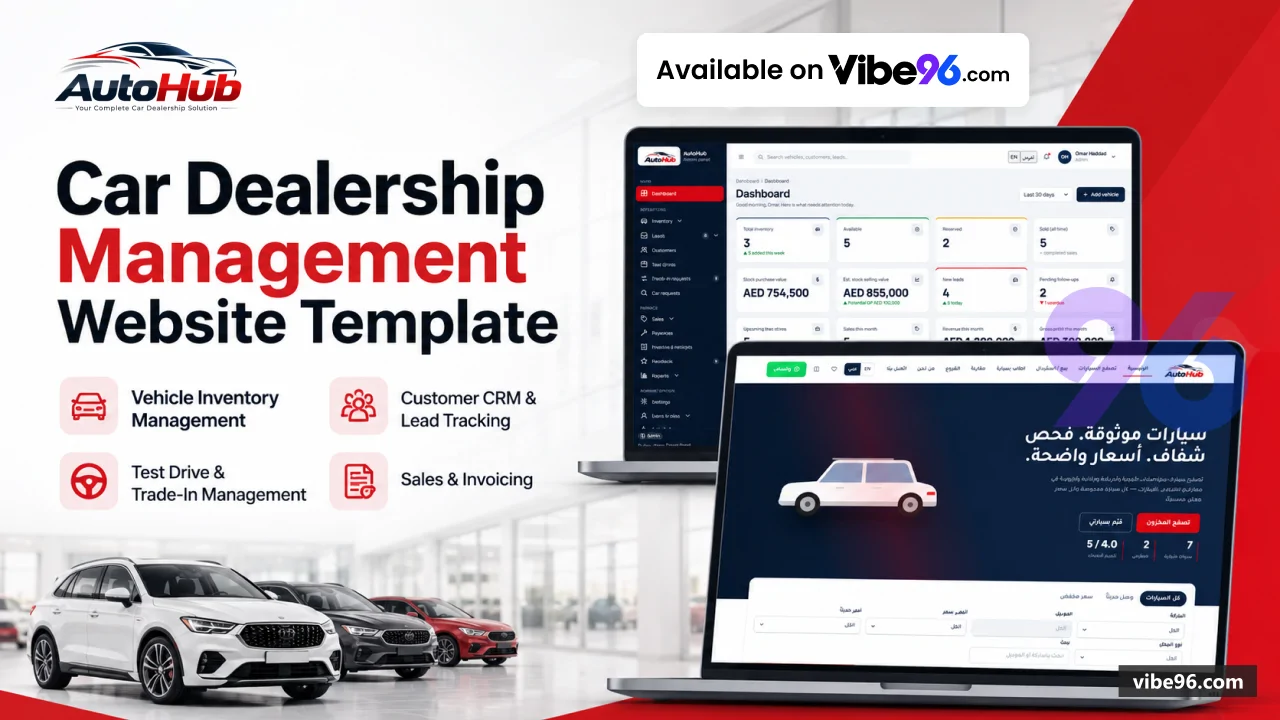
AutoHub is a single ASP.NET Core MVC app (.NET 10) with SQL Server, accessed through plain ADO.NET with parameterised queries and no ORM. The public site lets signed-in customers browse and filter stock, book test drives, send enquiries, request cars, submit sell or trade-in requests, and reserve or pay for a car through a simulated payment gateway. The admin panel under /admin covers inventory, leads, customers, test drives, trade-ins, sales, invoices, payments, expenses, reports, users and settings. It ships with Docker Compose, a Dockerfile, setup docs, SQL schema and seed scripts, and a PowerShell smoke test. Online payment is a simulator active only in test mode; no real payment provider is evidenced in the digest.
Why AutoHub Dealership Platform
What makes it better
than the alternatives
- 01
Buy and sell flows
Customers with an account can buy, send sell or trade-in requests, request a specific car, and leave feedback.
- 02
Bilingual with RTL
English and Arabic resource files, a language switcher and an Arabic home page screenshot are included.
- 03
Full dealership back office
Inventory with ageing and price history, CRM leads with follow-ups, sales, invoices, receipts, payments and per-vehicle expenses.
- 04
Role-based admin security
Permission-matrix policies, BCrypt password hashing, brute-force lockout, anti-forgery on all posts, rate-limited public forms and an audit activity log.
- 05
Ready to deploy
Docker Compose with SQL Server 2022, a locked NuGet restore, a schema-and-seed database initializer, and docs for VPS and IIS hosting.
Public website
- Inventory search with filters
- sorting and pagination
- Vehicle detail page with gallery
- specs and finance calculator
- Compare up to 3 cars
- favourites and recently viewed
- Home
- About
- Branches
- Contact
- Privacy and Terms pages
Customer accounts
- Registration
- sign-in
- password change and email reset links
- My account with purchases
- enquiries
- test drives and payments
- Invoice PDF download
- Favourites synced to the account
Buying and booking
- Test-drive booking with live slot availability
- Enquiries and WhatsApp click tracking
- Online deposit or full payment via a simulated gateway that creates the sale
- invoice and receipt
Selling and requests
- Sell or trade-in request form
- Car request form
- Feedback form with approved testimonials on the home page
Inventory management
- Create
- edit
- duplicate and bulk-update vehicles
- CSV export and an import screen
- Ageing report and price history
- Photo upload and branch assignment
CRM and leads
- Lead inbox with status
- priority and source
- Round-robin assignment and notifications
- Follow-ups
- notes and activity timeline
- Customers
- test drives and trade-in screens
Sales and finance
- Sales with payments
- invoices and receipts
- PDF invoices and receipts via QuestPDF
- Vehicle expenses with receipt uploads and approval status
Reports and dashboard
- Dashboard with stock value
- monthly sales
- revenue and profit
- Inventory
- ageing
- sales
- profit
- leads
- expenses and payments reports
Administration
- Staff users and roles with a permission matrix
- Settings for company
- branding
- contact
- leads
- payment
- notifications
- localisation and documents
- Branches
- makes
- models
- features and master data
- Activity logs and notifications
| Language | Version | Framework | Used for | Share of code |
|---|---|---|---|---|
| C# | — | — | Web, API, admin | 48.2% |
| SQL | — | — | Database | 17.1% |
| C# (Razor) | — | — | Web pages | 16.7% |
| CSS | — | — | Styling | 9.7% |
| JavaScript | — | — | Front-end | 6.8% |
| PowerShell | — | — | Scripts | 1.4% |
- Primary language
- C# on .NET 10 (ASP.NET Core MVC)
- Framework
- ASP.NET Core MVC on .NET 10
- Database
- SQL Server 2019+ (Docker image uses SQL Server 2022)
- Authentication
- ASP.NET Core cookie authentication with separate staff and customer cookies, BCrypt password hashing, role policies, and a 15-minute brute-force lockout
- Licence
- Single-site
- Screens
- 79
- Database tables
- 25
- Supported languages
- English and Arabic (switchable in Settings); Arabic uses RTL layout
- Browser support
- Not specified in the code; server-rendered pages with vanilla JavaScript
| Minimum | Recommended | |
|---|---|---|
| CPU | 2 vCPU | 4 vCPU |
| RAM | 4 GB | 8 GB |
| OS | Linux or Windows Server with the .NET 10 ASP.NET Core runtime and SQL Server 2019+ | Linux or Windows Server with the .NET 10 ASP.NET Core runtime and SQL Server 2019+ |
| Est. monthly hosting | $35 | $35 |
1. Set the SQL Server SA password in a `.env` file next to `docker-compose.yml`:
```
MSSQL_SA_PASSWORD=<strong-password>
```
2. Build and start the web app and database:
```
docker compose up -d --build
```
3. Open http://localhost:8080 (website) and http://localhost:8080/admin (admin panel).
1. Create the database by running `database/schema.sql` against your SQL Server instance (for example with `sqlcmd -S <host> -U <user> -P <password> -i database/schema.sql`).
2. Set the connection string in `appsettings.json` or as an environment variable, `ConnectionStrings__AutoHub`.
3. Publish the app:
```
dotnet publish "NET Project/AutoHub.Web.csproj" -c Release -o ./publish
```
4. Run it: `dotnet AutoHub.Web.dll` from the publish folder. See HowToSetup.md for reverse proxy and service setup.
Quality report
Manually reviewedHow to read the quality report
What this is. Every project on Vibe96 goes through an automated audit of its source code before a reviewer in Dubai checks it by hand. The score is out of 100; 75 is the minimum to be listed, and any single failing check blocks a listing regardless of the score.
- Security
- No real credentials in the code, every data-changing route protected, admin areas role-gated, no SQL built from user input.
- Code structure
- A developer can navigate and extend it: clear module boundaries, no giant files, little copy-paste.
- Docs & completeness
- The setup guide, example config, schema and required files the builder committed to are actually in the archive.
- Dependency health
- Packages pinned, no known critical vulnerabilities, no abandoned libraries in production paths.
- Build & deploy
- A clean machine can restore, build and start it by following the shipped instructions.
Warnings are problems that didn't block the listing; they stay visible here until a later version clears them. The audit reads the code — it does not run it — so always try the live demo before you buy. Lines of code are counted from the same audited archive.
79/ 100
Automated audit score
✓ Approved by our review teamReviewer notes (5 minor)
Small improvements the developer has been told about. None of them stop the software from working.
Versions & updates
No updates yet. New versions appear here with a changelog.
Buyers receive updates free for 1 year.
What you get
- </>Full source codeThe complete audited source, delivered as a download from your account. No obfuscation.
- ▤DocumentationSetup guide, architecture notes, CLAUDE.md and AGENTS.md.
- ↻One year of updatesEvery new version the builder publishes, free for 12 months.
- ♧30 days of supportInstallation and defect support through Vibe96 tickets.