 Built by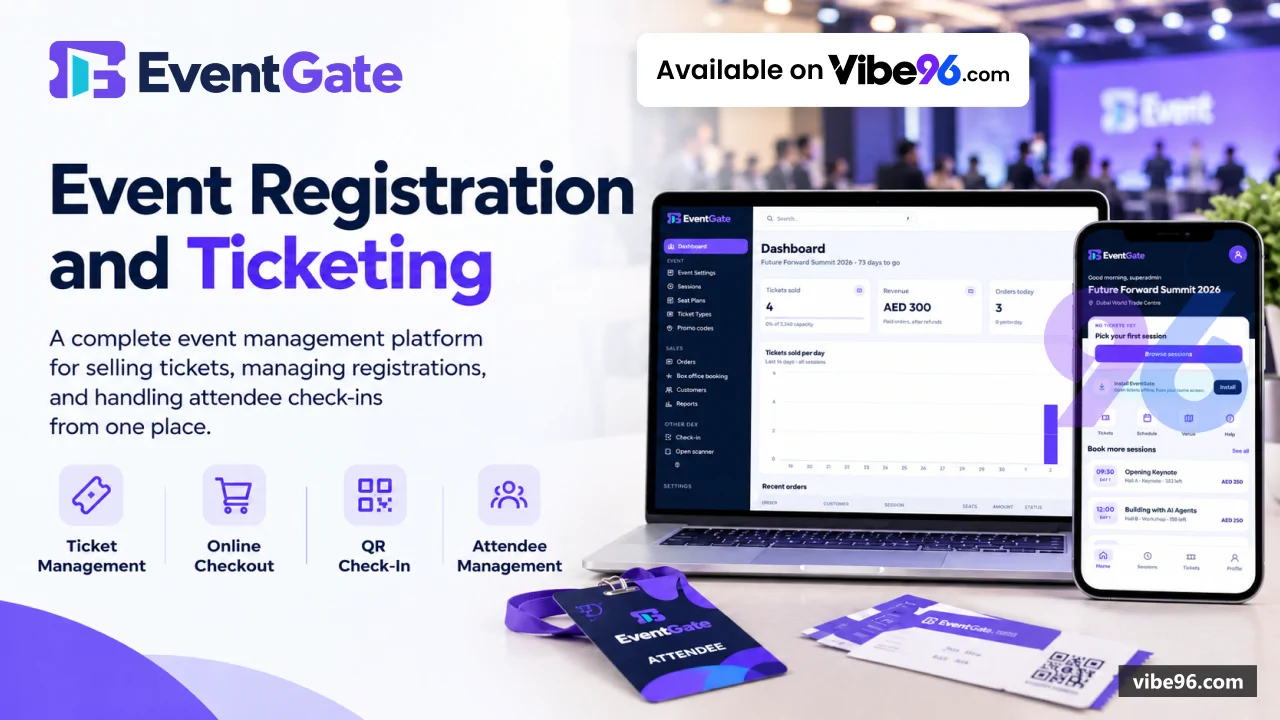
Why EvsntGate
What makes it better
than the alternatives
- 01
Live seat map with instant hold visibility
Other buyers' selections appear within seconds, preventing double-booking through a unique database index
- 02
Signed QR tickets with transfer capability
Guests can send a ticket to someone else, invalidating the original QR code and generating a new one for the recipient
- 03
All-Access passes for multi-session events
One pass covers every session, with holders choosing their seat per session in the app while reserved zones keep seats available
- 04
Three payment gateways plus sandbox testing
Stripe (cards, Apple Pay, Google Pay), Telr and N-Genius with hosted pages, automatic reconciliation and provider-specific refunds
- 05
Arabic text support on ticket PDFs
Names and titles print correctly using custom Arabic shaping and forms tables, with VAT-inclusive pricing in AED for Gulf markets
Event Website (Public)
- Home
- schedule
- session
- venue
- FAQ and contact pages built mobile-first with Tailwind CSS
- Live seat map showing Regular
- VIP and Wheelchair zones with real-time hold and sale updates
- Seat hold during checkout with automatic release if payment not completed within window
- Checkout flow with name-per-ticket
- promo code validation
- VAT-inclusive totals and payment window countdown
- Early-bird pricing per session and seat zone
- sales-open time and maintenance mode toggle
Customer App (PWA)
- Installable progressive web app at /app with offline QR code display
- Ticket list showing all purchased tickets with signed QR codes
- Transfer ticket to another person by email
- invalidating sender's QR and generating new code for recipient
- All-Access pass management: view pass
- select seat per session
- see chosen seats
- Apple Wallet and Google Wallet pass download (optional
- configured per event)
Payment Processing
- Stripe integration with cards
- Apple Pay and Google Pay via hosted checkout page
- Telr and Network International N-Genius gateways for Gulf region payments
- Sandbox test gateway for demos and staging environments with simulated success/failure
- Webhook signature verification for Stripe (HMAC-SHA256)
- Telr and N-Genius notifications
- Automatic reconciliation job checking unpaid orders with provider to catch lost notifications
- Refund processing through original payment provider for whole orders or individual tickets
Ticket Generation & Delivery
- Signed QR e-tickets using HMAC-SHA256 with TicketSigningKey
- encoding ticket ID and session ID
- PDF generation with one A5 page per ticket
- including QR code
- event details and holder name
- Arabic name rendering on PDFs using custom ArabicShaper with forms table and right-to-left layout
- Email delivery via SMTP (Amazon SES
- Office 365) with HTML templates and merge fields
- Apple Wallet pass generation with PKCS#7 signing and manifest/signature files
- Google Wallet pass creation via JWT signing and pass object API
Gate Entry & Scanning
- Phone/tablet camera scanner at /gate with real-time QR code detection
- USB and Bluetooth barcode scanner support for handheld devices
- Full-screen check-in display showing ticket holder name
- session
- seat and check-in status
- Duplicate scan detection with timestamp of first check-in and staff member who scanned
- Offline mode: scanner works without network
- syncs check-ins when connection restored
- Role-based access: all staff roles (Super Admin
- Admin
- Box Office
- Gate Staff) can scan
Admin Panel — Sales & Box Office
- Dashboard with today's sales
- revenue
- check-ins and top sessions
- Order list with filters (date range
- status
- payment method
- session) and CSV export
- Order detail page showing customer info
- tickets
- payments
- refunds and timeline
- Box office: create order for walk-in customer
- select seats
- take payment or mark as paid
- Promo code management: create codes with discount amount/percentage
- usage limits and expiry
- Customer search and order history view
Admin Panel — Event Setup
- Event settings: name
- dates
- venue
- description
- logo upload
- maintenance mode toggle
- Session management: create sessions with start/end times
- hall assignment
- capacity
- Seat plan editor: define halls with rows
- seats per row
- zone assignments (Regular/VIP/Wheelchair)
- Ticket type configuration: set prices per session and zone
- early-bird pricing with cutoff date
- All-Access pass setup: enable passes
- set price
- configure reserved seat count per zone
- Sales window: set sales-open time
- payment window duration
- hold cleanup interval
Admin Panel — Reports & Audit
- Sales report: revenue by session
- ticket type
- payment method with CSV export
- Check-in report: attendance by session
- zone
- time with percentage calculations
- Seat occupancy report: sold/held/available seats per session and zone
- Promo code usage report: redemptions
- discount totals
- revenue impact
- Audit log: all admin actions (order creation
- refunds
- settings changes) with timestamp and user
- Email log: sent emails with status
- recipient
- template and retry count
Security & Access Control
- ASP.NET Core Identity with five roles: Super Admin
- Admin
- Box Office
- Gate Staff
- Customer
- Two-factor authentication required for all staff roles (Super Admin
- Admin
- Box Office
- Gate Staff)
- Email verification required for customer accounts before ticket purchase
- Password reset via email with signed token
- 1-hour expiry
- Rate limiting on payment return page (30 requests/minute per IP) and sign-in attempts
- Authorization policies: AdminOnly
- StaffOnly
- BoxOfficeOrAbove enforced on pages and endpoints
Database & Background Jobs
- SQL Server with EF Core 10
- schema deployed via database/schema.sql or migrations
- Unique index on (SessionId
- SeatId) preventing double-booking at database level
- Hold cleanup job running every 60 seconds
- releasing expired seat holds
- Email dispatch background service processing queue with retry logic (3 attempts)
- Payment reconciliation job checking unpaid orders with provider every 5 minutes
- Event reminder service sending emails 24 hours before session start time
| Language | Version | Framework | Used for | Share of code |
|---|---|---|---|---|
| C# | — | — | Web, API, admin | 83.5% |
| C# (Razor) | — | — | Web pages | 8.1% |
| SQL | — | — | Database | 6.6% |
| PowerShell | — | — | Scripts | 1.8% |
- Primary language
- C# 12 (.NET 10)
- Framework
- ASP.NET Core 10 Blazor Server
- Database
- SQL Server 2019+
- Authentication
- ASP.NET Core Identity with 2FA for staff
- Licence
- Single-site
- Screens
- 42
- Database tables
- 24
- Supported languages
- English (UI), Arabic names on tickets (RTL shaping)
- Browser support
- Modern browsers (Chrome, Safari, Edge, Firefox); PWA installable on iOS/Android
| Minimum | Recommended | |
|---|---|---|
| CPU | 2 vCPU | 4 vCPU |
| RAM | 4 GB RAM / 20 GB SSD | 8 GB RAM / 40 GB SSD |
| OS | Linux (Ubuntu 22.04+) or Windows Server 2019+, .NET 10 runtime | Linux (Ubuntu 22.04+) or Windows Server 2019+, .NET 10 runtime |
| Est. monthly hosting | $25 | $25 |
```bash
# Build and run with Docker Compose
docker-compose up -d
# Database setup (first time)
docker exec eventgate-web dotnet ef database update
```
```bash
# Install .NET 10 runtime
wget https://dot.net/v1/dotnet-install.sh
sudo bash dotnet-install.sh --channel 10.0 --runtime aspnetcore
# Deploy release
sudo mkdir -p /var/www/eventgate
sudo unzip EventGate-release.zip -d /var/www/eventgate
# Configure systemd service
sudo systemctl enable eventgate
sudo systemctl start eventgate
# Setup database (see HowToSetup.md)
pwsh ./NET\ Project/deploy/db/Install-Database.ps1
```
```bash
# Create resources
az group create --name eventgate-rg --location eastus
az sql server create --name eventgate-sql --resource-group eventgate-rg
az webapp create --name eventgate --resource-group eventgate-rg --runtime "DOTNETCORE:10.0"
# Deploy
az webapp deployment source config-zip --resource-group eventgate-rg --name eventgate --src EventGate-release.zip
# Configure app settings (see appsettings.example.json)
az webapp config appsettings set --resource-group eventgate-rg --name eventgate --settings ConnectionStrings__EventGate="Server=..."
```
```bash
# Install SQL Server (Docker)
docker run -e "ACCEPT_EULA=Y" -e "SA_PASSWORD=YourStrong@Passw0rd" -p 1433:1433 -d mcr.microsoft.com/mssql/server:2019-latest
# Restore packages and build
cd "NET Project"
dotnet restore
dotnet build
# Setup database
pwsh deploy/db/Install-Database.ps1
# Configure user secrets
dotnet user-secrets set "ConnectionStrings:EventGate" "Server=localhost,1433;Database=EventGate;User Id=sa;Password=YourStrong@Passw0rd;TrustServerCertificate=True"
dotnet user-secrets set "Seed:AdminEmail" "admin@example.com"
dotnet user-secrets set "Seed:AdminPassword" "TempPass123!"
# Run
cd src/EventGate.Web
dotnet run
```
Quality report
Manually reviewedHow to read the quality report
What this is. Every project on Vibe96 goes through an automated audit of its source code before a reviewer in Dubai checks it by hand. The score is out of 100; 75 is the minimum to be listed, and any single failing check blocks a listing regardless of the score.
- Security
- No real credentials in the code, every data-changing route protected, admin areas role-gated, no SQL built from user input.
- Code structure
- A developer can navigate and extend it: clear module boundaries, no giant files, little copy-paste.
- Docs & completeness
- The setup guide, example config, schema and required files the builder committed to are actually in the archive.
- Dependency health
- Packages pinned, no known critical vulnerabilities, no abandoned libraries in production paths.
- Build & deploy
- A clean machine can restore, build and start it by following the shipped instructions.
Warnings are problems that didn't block the listing; they stay visible here until a later version clears them. The audit reads the code — it does not run it — so always try the live demo before you buy. Lines of code are counted from the same audited archive.
What to know before you buy
4 non-blocking findings shown publicly: strong authz on mutating endpoints; minor ownership gaps on read-only admin lookups; good module boundaries; some service oversizing and minor duplication in email/payment flows; no real credentials found; weak default signing key in development config needs attention; database access is safe; minor schema gaps (missing indexes on some foreign keys). The seller has been notified; fixes ship in the next version.
Versions & updates
No updates yet. New versions appear here with a changelog.
Buyers receive updates free for 1 year.
What you get
- </>Full source codeThe complete audited source, delivered as a download from your account. No obfuscation.
- ▤DocumentationSetup guide, architecture notes, CLAUDE.md and AGENTS.md.
- ↻One year of updatesEvery new version the builder publishes, free for 12 months.
- ♧30 days of supportInstallation and defect support through Vibe96 tickets.