About this software
About Nutrilens
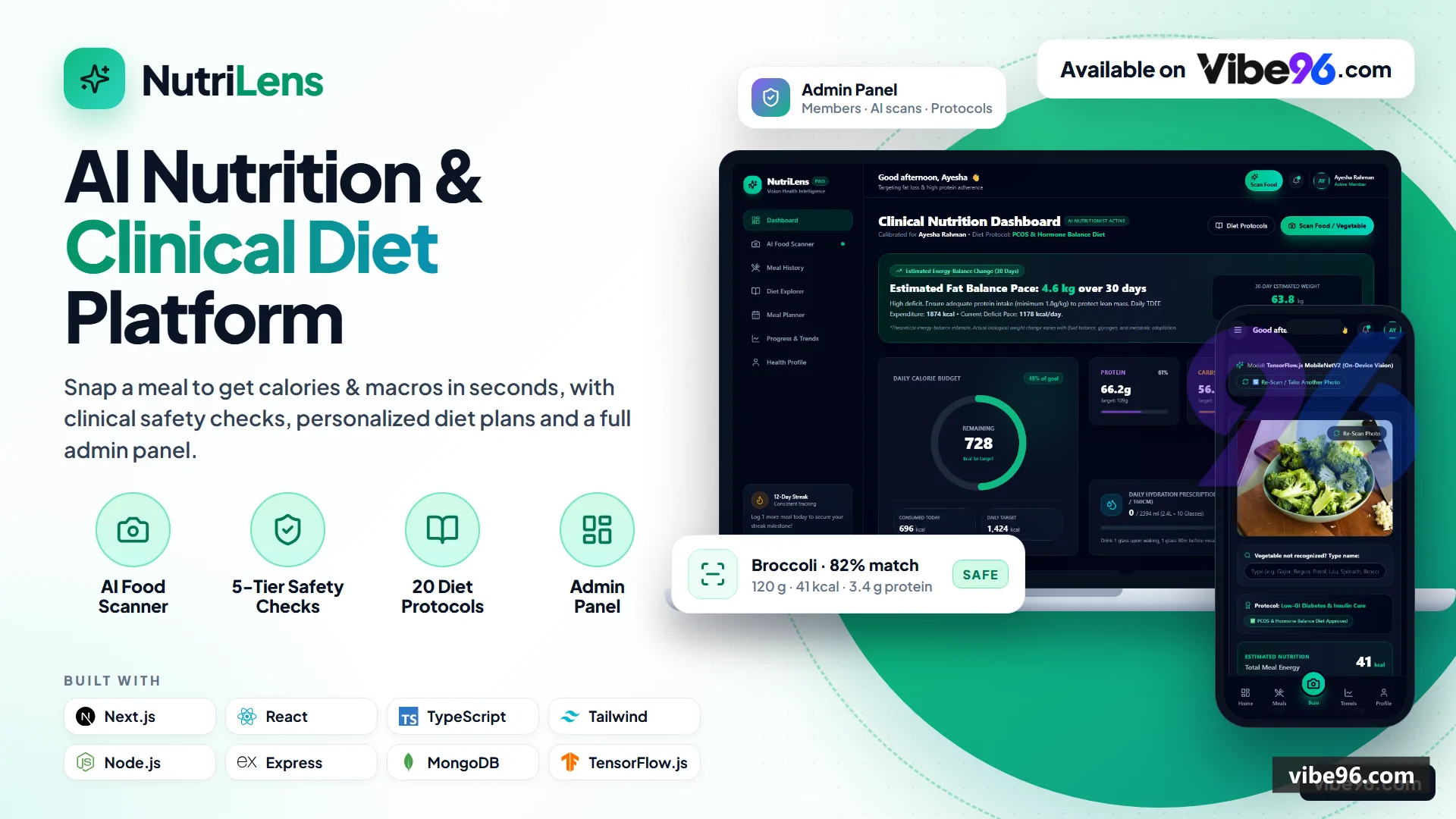
NutriLens is a full-stack nutrition-tracking web app built with Next.js 15 and Express/MongoDB. It features JWT authentication, an 8-step onboarding flow, and an AI food scanner that identifies meals using TensorFlow.js MobileNetV2 with 64-bit perceptual hashing for visual memory. The system applies clinical safety tiers (SAFE, CAUTION, MODERATE, LIMIT, AVOID) aligned with ADA, AHA, and KDIGO guidelines across 20 evidence-graded diet protocols. Users can log meals, track weight with charts, plan weekly menus, explore a vegetable reference library, and receive personalized diet recommendations based on their health profile.
Why Nutrilens
What makes it better
than the alternatives
- 01
On-Device AI Vision
- 02
Bit Visual Memory (dHash)
- 03
Tier Clinical Compliance Engine
- 04
Canonical 20-Diet System
- 05
Adaptive Food Swap Intelligence
Authentication & Onboarding
- JWT-based registration and login with HS256 signing (7-day stateless tokens)
- Password reset flow with SHA-256 hashed tokens and SMTP email delivery (console fallback in dev)
- 8-step nutrition assessment collecting biometrics
- goals
- health conditions
- allergies
- medications
- and dietary preferences
- Per-IP rate limiting on auth endpoints (configurable window and max attempts)
- Account security page with password change requiring current password verification
AI Food Scanner
- Browser-native TensorFlow.js MobileNetV2 classification with canvas chromatic and texture analysis
- Multi-candidate suggestion chips (e.g.
- Tomato
- Red Bell Pepper
- Cherry Tomato) for instant 1-click swap
- 64-bit dHash perceptual fingerprinting stores user corrections in LearnedFoodMatch collection
- Portion selector with live macro recalculation (grams
- cups
- pieces
- servings)
- 5-tier clinical safety evaluation
SAFE/CAUTION/MODERATE/LIMIT/AVOIDper active diet and medical conditions - Scan history with image thumbnails
- detected items
- and nutrition summaries
Meal Logging
- Create
- read
- update
- delete meal entries with type (breakfast
- lunch
- dinner
- snack)
- date
- time
- and notes
- Multi-item meals with per-item and aggregate macros (calories
- protein
- carbs
- fat
- fiber)
- Server-side total recalculation from items array on every update (client totals are never trusted)
- Date-filtered meal retrieval for daily summaries and progress tracking
- Image attachment support for meal photos
Diet Protocols & Recommendations
- Canonical 20-diet catalog (Keto
- Mediterranean
- DASH
- Paleo
- Vegan
- Low-FODMAP
- Carnivore
- etc.) served from JSON
- Personalized diet ranking engine scoring protocols by user profile
- goals
- and medical conditions
- Adopt diet flow with safety validation
- professional review flags
- and personalized macro target calculation
- Food swap alternatives API suggesting diet-compliant substitutions with nutritional similarity scoring
- Adaptive review endpoint tracking adherence
- satisfaction
- and side effects for plan adjustments
Weekly Meal Planner
- Add
- view
- delete planned meal slots by day of week (0-6) and meal type
- Pre-populate planner with diet-specific meal templates during onboarding
- Drag-and-drop interface for rearranging planned meals across days
- Nutrition totals per day and per week from planned meals
- Copy planned meals to actual meal log with one click
Progress Tracking & Analytics
- Weight log with upsert by date
- chart visualization
- and trend calculation
- Nutrition history aggregating daily totals from meals over configurable period (default 30 days)
- Progress summary combining weight logs and recent meal counts
- Goal vs. actual comparison for calories
- protein
- carbs
- fat
- and fiber
- Export all user data (profile
- meals
- scans
- planner
- weight logs) as JSON
Vegetable Reference Library
- Browse 100+ vegetables with Bengali names
- scientific names
- and nutritional data per 100g
- Search by name
- alias
- category
- or scientific name with fuzzy matching
- Category filtering (Leafy Greens
- Root Vegetables
- Cruciferous
- etc.) and sorting by macros
- Detailed modal with health benefits
- cooking tips
- storage advice
- and seasonal availability
- Portion calculator converting grams to cups/pieces with live macro updates
- Offline fallback serving static VEGETABLES_DATA when MongoDB is unavailable
User Profile & Settings
- Edit biometrics (height
- weight
- waist
- target weight)
- activity level
- and primary goal
- Manage health conditions
- allergies
- medications
- and dietary preferences
- Update nutrition targets (calories
- protein
- carbs
- fat
- fiber
- water) manually or via diet adoption
- Avatar upload and display
- Account deletion with password confirmation (cascades to meals
- scans
- planner
- weight logs)
Admin & Shared Food Catalog
- Admin-only POST /api/foods endpoint for adding foods to shared catalog (emails in ADMIN_EMAILS env var)
- Public GET /api/foods with category and search filtering for all users
- Food model with name
- category
- macros per 100g
- tags
- and optional image URL
- Seeder script populates 50+ Bangladeshi foods and vegetables on npm run seed
| Language | Version | Framework | Used for | Share of code |
|---|---|---|---|---|
| TypeScript (React) | — | — | Front-end | 41.2% |
| JavaScript | — | — | Front-end | 37.1% |
| TypeScript | — | — | Front-end | 18.1% |
| HTML | — | — | Front-end | 1.8% |
| SQL | — | — | Database | 1.5% |
| CSS | — | — | Styling | 0.3% |
- Primary language
- JavaScript (Node.js 20+) + TypeScript 5.7
- Framework
- Next.js 15.1 (React 19) + Express 4.21
- Database
- MongoDB 5.0+
- Authentication
- JWT (HS256, 7-day stateless tokens)
- Licence
- Single-site
- Screens
- 14
- Database tables
- 8
- Supported languages
- English only
- Browser support
- Modern browsers (ES2020+, Chrome 90+, Firefox 88+, Safari 14+, Edge 90+)
| Minimum | Recommended | |
|---|---|---|
| CPU | 1 vCPU | 2 vCPU |
| RAM | 1 GB RAM | 2 GB RAM |
| OS | Node.js 20+ on Linux/macOS/Windows | Node.js 20+ on Linux/macOS/Windows |
| Est. monthly hosting | $15 | $15 |
```bash
# Clone and configure
git clone <repo-url> nutrilens
cd nutrilens
cp server/.env.example server/.env
cp web/.env.example web/.env
# Edit server/.env: set MONGODB_URI, JWT_SECRET
# Edit web/.env: set NEXT_PUBLIC_API_URL=http://localhost:5000

# Build and run
docker-compose up -d
# Seed demo data
docker-compose exec server npm run seed
# Access at http://localhost:3000
```
```bash
# Install Node.js 20 and MongoDB
curl -fsSL https://deb.nodesource.com/setup_20.x | sudo -E bash -
sudo apt-get install -y nodejs mongodb-org
sudo systemctl start mongod

# Clone and install
git clone <repo-url> nutrilens
cd nutrilens
cp server/.env.example server/.env
cp web/.env.example web/.env
# Edit server/.env: set MONGODB_URI=mongodb://localhost:27017/nutrilens, JWT_SECRET
# Edit web/.env: set NEXT_PUBLIC_API_URL=http://your-domain.com:5000

cd server && npm install && cd ../web && npm install && cd ..

# Seed and start with PM2
cd server && npm run seed && cd ..
sudo npm install -g pm2
pm2 start server/src/index.js --name nutrilens-api
pm2 start npm --name nutrilens-web -- --prefix web start
pm2 save
pm2 startup
```
```bash
# 1. Push code to GitHub
# 2. Create MongoDB Atlas cluster, get connection string
# 3. In Render dashboard:
#    - New Web Service (server): Build=npm --prefix server install, Start=npm --prefix server start
#      Add env vars: MONGODB_URI, JWT_SECRET, NODE_ENV=production
#    - New Web Service (web): Build=npm --prefix web install && npm --prefix web run build, Start=npm --prefix web start
#      Add env var: NEXT_PUBLIC_API_URL=https://nutrilens-api.onrender.com
# 4. Seed data:
curl -X POST https://nutrilens-api.onrender.com/api/seed
```
```bash
# Install dependencies
cd server && npm install && cd ../web && npm install && cd ..

# Configure (use local MongoDB or Atlas)
cp server/.env.example server/.env
cp web/.env.example web/.env
# Edit server/.env: set MONGODB_URI, generate JWT_SECRET with:
# node -e "console.log(require('crypto').randomBytes(48).toString('hex'))"
# Edit web/.env: NEXT_PUBLIC_API_URL=http://localhost:5000

# Start MongoDB (if local)
mongod --dbpath ./data/db

# Seed demo data
cd server && npm run seed && cd ..

# Run (two terminals)
cd server && npm run dev  # Terminal 1: API on :5000
cd web && npm run dev     # Terminal 2: UI on :3000

# Or use concurrently from root:
npm run dev
```Quality report
Manually reviewedHow to read the quality report
What this is. Every project on Vibe96 goes through an automated audit of its source code before a reviewer in Dubai checks it by hand. The score is out of 100; 75 is the minimum to be listed, and any single failing check blocks a listing regardless of the score.
- Security
- No real credentials in the code, every data-changing route protected, admin areas role-gated, no SQL built from user input.
- Code structure
- A developer can navigate and extend it: clear module boundaries, no giant files, little copy-paste.
- Docs & completeness
- The setup guide, example config, schema and required files the builder committed to are actually in the archive.
- Dependency health
- Packages pinned, no known critical vulnerabilities, no abandoned libraries in production paths.
- Build & deploy
- A clean machine can restore, build and start it by following the shipped instructions.
Warnings are problems that didn't block the listing; they stay visible here until a later version clears them. The audit reads the code — it does not run it — so always try the live demo before you buy. Lines of code are counted from the same audited archive.
Reviewer notes (2 minor)
Small improvements the developer has been told about. None of them stop the software from working.
Versions & updates
No updates yet. New versions appear here with a changelog.
Buyers receive updates free for 1 year.
What you get
- </>Full source codeThe complete audited source, delivered as a download from your account. No obfuscation.
- ▤DocumentationSetup guide, architecture notes, CLAUDE.md and AGENTS.md.
- ↻One year of updatesEvery new version the builder publishes, free for 12 months.
- ♧30 days of supportInstallation and defect support through Vibe96 tickets.