 Built by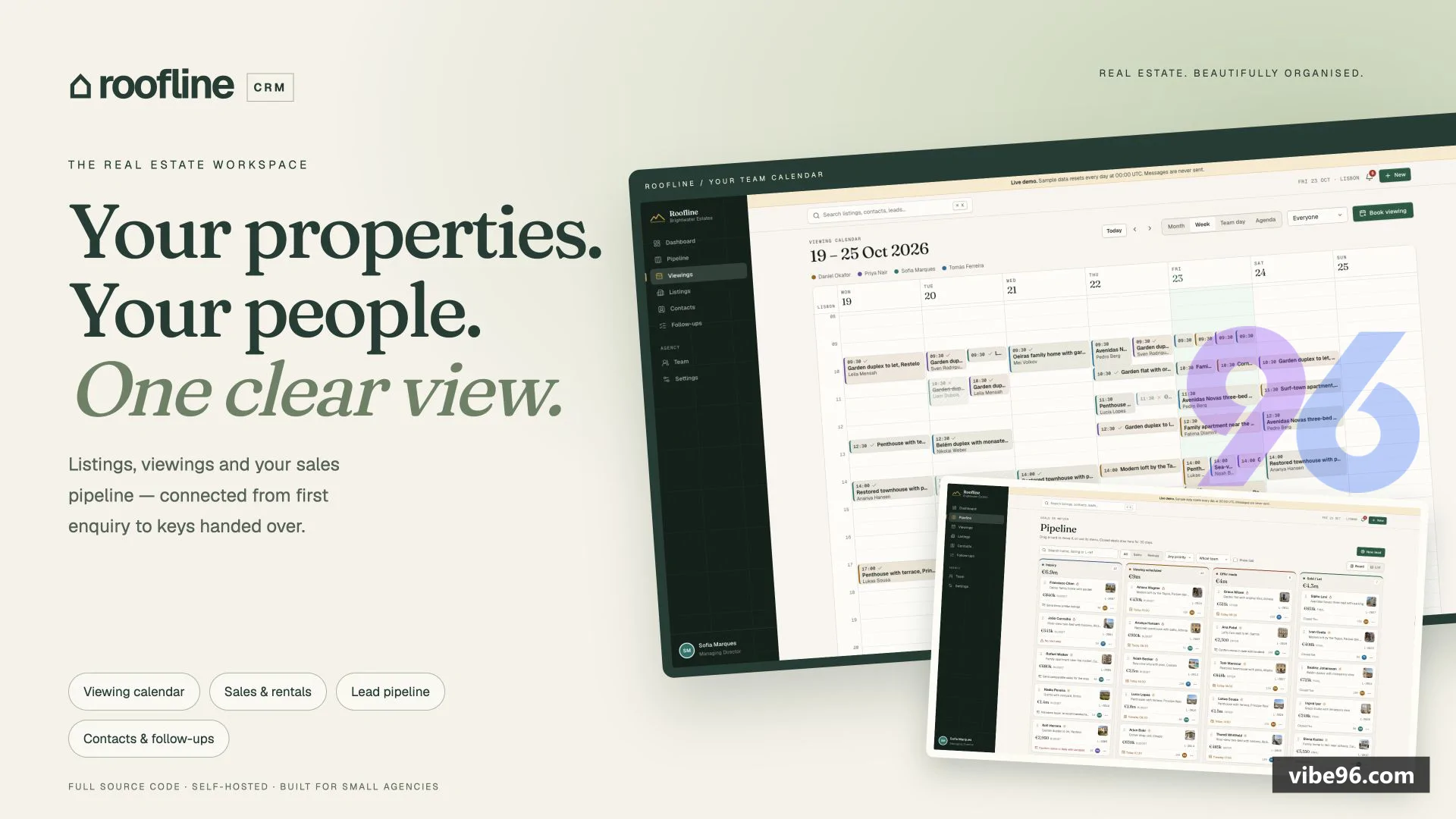
About this software
About Roofline CRM – Real Estate CRM with Viewing Calendar
Roofline CRM brings property listings, buyers and sellers, viewings and follow-ups into one workspace for small agencies. Manage sales and rentals with a drag-and-drop pipeline, month/week/team-day calendar, conflict warnings and calendar export. Match contacts to listings, log notes and track overdue tasks. Admins manage the team, settings and branding; agents see their own contacts, leads and viewings. Choose your currency, time zone and area unit. Includes TypeScript source, database schema, demo seed, setup guides and automated tests. Runs with Docker Compose, Node.js + PostgreSQL, or Cloudflare Workers + Neon.
Why Roofline CRM – Real Estate CRM with Viewing Calendar
What makes it better
than the alternatives
- 01
International settings
Any ISO currency, 20 English number/date formats (US, UK, India, UAE, Germany), agency time zone, m² or ft².
- 02
Viewing calendar
Month, week, team day and agenda views; drag-and-drop rescheduling with conflict warnings; outcome recording and .ics export.
- 03
Pipeline board
Drag leads through Inquiry → Viewing → Offer → Sold/Let stages; cards flag missing next steps and show upcoming viewings.
- 04
Role-based access
Admins see everything; agents see shared listings but only their own contacts, leads, viewings and follow-ups (enforced in SQL).
- 05
Photo management
Up to 12 photos per listing, resized in the browser before upload; gallery view on listing detail pages.
Listings
- Sale and rental properties (per week
- month or year)
- Eight property types with status from draft to sold/let
- Up to 12 photos per listing
- resized before upload
- Owner (seller/landlord)
- features
- floor area in m² or ft²
- price per area unit
- Matching available listings shown on contact requirements
Contacts
- Buyers
- sellers
- tenants and landlords in one record
- Duplicate warning on email or phone
- Requirements: budget
- bedrooms
- areas
- One-click call
- WhatsApp and email links
- Timeline of notes
- viewings and activity
Pipeline
- Stages: Inquiry → Viewing scheduled → Offer made → Sold/Let
- plus Lost with reason
- Drag-and-drop board or list view
- Filter by sale/rent
- priority and agent
- Booking a viewing moves inquiry forward; offer marks listing under offer
- Cards flag leads with no next step
- show next viewing or follow-up
Viewing Calendar
- Month
- week
- team day (one column per agent) and agenda views
- Click empty slot to book; client and listing pickers search as you type
- Drag viewing to reschedule; conflict warnings if agent or listing already booked
- Record outcome and client feedback
- Add to Google
- Apple or Outlook calendar (.ics export)
Notes and Follow-ups
- Log calls
- emails
- meetings and notes on leads
- contacts or listings
- Follow-ups with due times
- Overdue follow-ups show on bell icon
- Activity feed on dashboard
- Timeline view on contact detail pages
Dashboard
- Today's viewings
- follow-ups due
- open leads
- offers on table
- deals closed this month
- Pipeline value by stage
- lead sources
- leads going cold
- Activity feed of recent notes and viewings
- Team table (admins only) with each agent's numbers
- KPI ledger and pipeline funnel charts
Team and Roles
- Admin role: full access plus team
- settings and branding
- Agent role: shared listings; only own contacts
- leads
- viewings and follow-ups
- Access rules enforced in SQL with record-level visibility checks
- Create users with temporary passwords
- Deactivate users without deleting their data
Settings and Branding
- Any ISO currency (amounts re-labelled
- never converted)
- 20 English number and date formats (US
- UK
- India
- UAE
- South Africa
- Germany)
- Agency time zone
- week start day
- m² or ft²
- Agency name
- logo upload
- tagline and accent colour
- Password change under My Account
Authentication and Security
- First-run setup screen creates agency and admin user
- Optional setup token for public servers
- PBKDF2 password hashing (600k iterations on Node
- 100k on Workers)
- Rate limiting on login
- password change and API endpoints
- Session cookies with secure
- httpOnly
- sameSite=lax; CSRF protection via origin check
Deployment
- Node.js server
src/server/entry/node.tswith PostgreSQL connection pool - Cloudflare Workers route
src/server/entry/worker.tswith Hyperdrive - Docker Compose with PostgreSQL 17
- Caddy reverse proxy and auto-migration
- Drizzle ORM migrations in
drizzle/folder - Vite build for React 19 frontend
- Hono API backend
| Language | Version | Framework | Used for | Share of code |
|---|---|---|---|---|
| TypeScript | — | — | Front-end | 51.9% |
| TypeScript (React) | — | — | Front-end | 42.8% |
| SQL | — | — | Database | 2.6% |
| CSS | — | — | Styling | 2.1% |
| HTML | — | — | Front-end | 0.4% |
| JavaScript | — | — | Front-end | 0.2% |
- Primary language
- TypeScript 6.0.3
- Framework
- React 19.3.1 + Hono 4.13.13
- Database
- PostgreSQL 17
- Authentication
- Session cookies (PBKDF2 password hashing)
- Licence
- Single-site
- Screens
- 14
- Database tables
- 12
- Supported languages
- English only
- Browser support
- Modern browsers (ES2022+, React 19 requires)
| Minimum | Recommended | |
|---|---|---|
| CPU | 1 vCPU | 2 vCPU |
| RAM | 1 GB | 2 GB |
| OS | Node.js 22.12+ or Cloudflare Workers | Node.js 22.12+ or Cloudflare Workers |
| Est. monthly hosting | $5 | $5 |
Extract ZIP and enter project folder. Copy .env.example to .env; set POSTGRES_PASSWORD and matching DATABASE_URL. Set SETUP_TOKEN for public servers.
```bash
cp .env.example .env
docker compose up -d --build
```
Open http://localhost:8787 and create agency/admin account. Use HTTPS reverse proxy on a VPS.
Requires Node.js 22.12+, pnpm 12.14.0 and PostgreSQL 17. Create database, copy .env.example to .env and configure DATABASE_URL.
```bash
corepack enable
pnpm install --frozen-lockfile
pnpm build
pnpm start
```
Migrations run on startup. Default port: 8787. Use process manager and HTTPS proxy.
Follow HowToSetup.md: create Neon database, apply migrations, create Hyperdrive with caching disabled, update wrangler.jsonc, then run pnpm deploy:cf.
Quality report
Manually reviewedHow to read the quality report
What this is. Every project on Vibe96 goes through an automated audit of its source code before a reviewer in Dubai checks it by hand. The score is out of 100; 75 is the minimum to be listed, and any single failing check blocks a listing regardless of the score.
- Security
- No real credentials in the code, every data-changing route protected, admin areas role-gated, no SQL built from user input.
- Code structure
- A developer can navigate and extend it: clear module boundaries, no giant files, little copy-paste.
- Docs & completeness
- The setup guide, example config, schema and required files the builder committed to are actually in the archive.
- Dependency health
- Packages pinned, no known critical vulnerabilities, no abandoned libraries in production paths.
- Build & deploy
- A clean machine can restore, build and start it by following the shipped instructions.
Warnings are problems that didn't block the listing; they stay visible here until a later version clears them. The audit reads the code — it does not run it — so always try the live demo before you buy. Lines of code are counted from the same audited archive.
Reviewer notes (2 minor)
Weak default passwords in examples and test fixtures; database access rules: well-scoped queries, minor schema gaps (missing indexes on fks). None of these stop the software from working; the developer has been told and improvements come in a future update.
Versions & updates
No updates yet. New versions appear here with a changelog.
Buyers receive updates free for 1 year.
What you get
- </>Full source codeThe complete audited source, delivered as a download from your account. No obfuscation.
- ▤DocumentationSetup guide, architecture notes, CLAUDE.md and AGENTS.md.
- ↻One year of updatesEvery new version the builder publishes, free for 12 months.
- ♧30 days of supportInstallation and defect support through Vibe96 tickets.