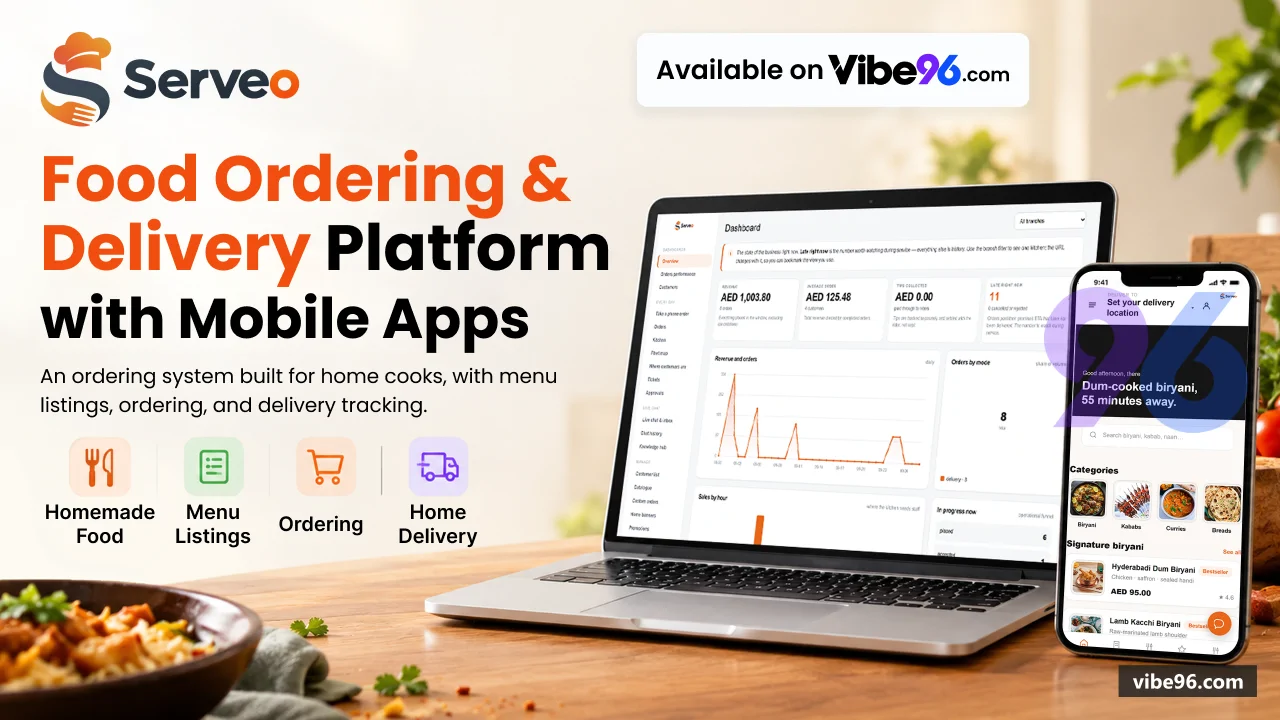
Why Servo - Restaurant Delivery Manager
What makes it better
than the alternatives
- 01
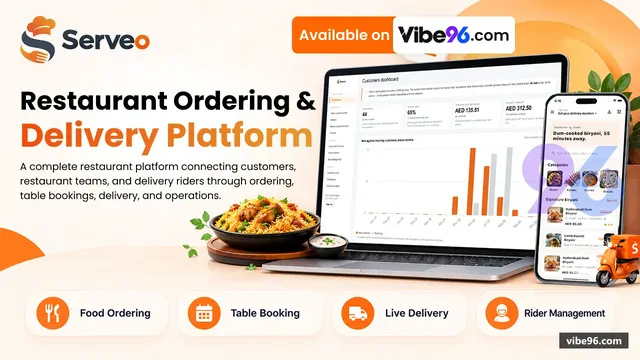
One deployment serves five surfaces
One deployment serves five surfaces
- 02
Server-side pricing engine calculates VAT, delivery fees, promotions, loyalty and tips in PricingService
Server-side pricing engine calculates VAT, delivery fees, promotions, loyalty and tips in PricingService
- 03
Row-level security enforced by SQL Server session context
Row-level security enforced by SQL Server session context
- 04
Automatic rider assignment by real road distance from Google Maps, with manual override and a rider simulator for demonstrations
Automatic rider assignment by real road distance from Google Maps, with manual override and a rider simulator for demonstrations
- 05
AI chat assistant with Claude integration, knowledge base and handover to human agents when the bot cannot answer
AI chat assistant with Claude integration, knowledge base and handover to human agents when the bot cannot answer
Customer Ordering (PWA)
- Browse menu by category with allergen warnings and item availability
- Four order modes: delivery
- takeaway
- dine-in and catering enquiries
- Server-side cart pricing with promotions
- loyalty points
- delivery fees and tips
- Scheduled orders
- gift orders with recipient and message
- contactless delivery notes
- Live rider tracking on a map with ETA and remaining distance
- Order history
- reorder
- rate and review
- report issues
- Table reservations with availability check and visual floor plan
- Guest checkout or verified account via one-time SMS code (OtpService)
- Installable PWA with offline support and push notifications
Delivery Agent App (PWA)
- Shift control: clock in
- clock out
- break
- earnings summary
- Job offers with distance
- fee and accept/decline
- Turn-by-turn navigation with Google Maps polyline
- Handover code verification
- photo and signature proof of delivery
- Failed delivery reasons and cash reconciliation
- Trip fees calculated from configurable settings (base fee
- per-km rate
- time-based multipliers)
- Live position broadcast over SignalR for customer tracking
- Rider simulator for demonstrations (RiderSimulatorService)
- Installable PWA
- works without sign-in when Demo:OpenRiderApi is on
Branch Portal & Kitchen Display
- Live ticket queue with audible alert and allergen highlighting
- Accept
- reject with reason
- advance through validated state machine (OrderStateMachine)
- Per-item availability toggle
- prep-time extension under load
- branch pause
- Manual rider assignment override with distance and availability check
- Table plan with reservation status
- call-waiter alerts (bill
- assistance
- complaint)
- Catering enquiry queue with quoted quantities and status tracking
- Branch reports: sales
- top items
- order counts
- rider performance
- Per-branch opening hours including Ramadan schedule
- delivery zones as polygons
- Permissions: OrdersView
- OrdersManage
- MenuAvailability
- TablesManage
- ReportsBranch
Head Office Console
- Catalogue: items
- categories
- modifiers
- allergens
- promotions with usage caps
- Branch management: hours
- modes
- delivery zones
- prep times
- service fees
- Rider fleet: onboarding
- vehicle assignment
- earnings
- shift history
- Order dashboard: live queue
- search
- detail
- manual status override
- refunds
- Customer insights: map
- order history
- loyalty tier
- wallet balance
- reviews
- Live chat inbox with AI assistant handover and knowledge base (AssistantService)
- Promotions: discount types
- per-customer limits
- date ranges
- branch restrictions
- Banners for customer home screen with image upload and ordering
- Users and permissions: 18 granular permissions (Perm constants in Permissions.cs)
- Reports: sales performance
- customer cohorts
- rider efficiency
- order trends
Dine-In QR Menu
- Scan QR code at table
- browse menu
- order without account or install
- Table service: call waiter for bill
- assistance or complaint (TableCall)
- Order status updates over SignalR
- kitchen prepares and delivers to table
- Reservation system with availability check and visual floor plan
- Table auto-release after reservation duration (TableReleaseService)
- No sign-in required
- orders linked to table number and session
Pricing & Promotions
- PricingService calculates all prices server-side: VAT
- delivery fee
- service charge
- promotions
- loyalty
- tips
- Promotions: percentage or fixed discount
- minimum order
- usage caps
- per-customer limits
- Loyalty points earned and redeemed
- customer tiers with benefits
- Delivery fees from zone polygons or distance-based calculation
- Service charge configurable per branch and mode (BranchMode.ServiceFeePct)
- Promo validation endpoint checks code against order before placement
- Cart pricing endpoint returns itemised breakdown with all fees visible
Delivery & Routing
- Automatic rider assignment by real road distance from Google Maps (AssignmentService)
- Delivery zones as polygons with per-zone fees
- minimums and ETAs
- Serviceability check before cart: lat/lng → nearest branch
- zone
- fee
- ETA
- Route polyline stored and sent to customer for live tracking
- Rider position updates over SignalR
- ETA recalculated from remaining distance
- Manual assignment override in branch portal and HQ console
- Rider simulator moves ghost riders around the map for demonstrations (RiderSimulationState)
- Failed delivery reasons: customer unavailable
- wrong address
- refused
- other
Chat & AI Assistant
- Customer chat bubble in app
- conversations addressed by random reference
- AI assistant powered by Claude (Anthropic API)
- configurable greeting and model
- Knowledge base: upload documents
- assistant answers from them (AssistantService)
- Handover to human agent when AI cannot answer or customer requests it
- Agent inbox in HQ console: open conversations
- message history
- resolve
- Chat history and analytics: conversation count
- handover rate
- resolution time
- Settings: enable/disable AI
- API key
- model
- greeting
- handover threshold
- Works without AI: every conversation goes straight to human agent when disabled
Reservations & Tables
- Table plan with visual floor plan
- seat count
- status (available
- reserved
- occupied
- blocked)
- Reservation availability check: which tables are free at a requested time
- Book by phone or from customer app
- reference generated (RSV-1234)
- Reservation status: confirmed
- seated
- completed
- cancelled
- no-show
- Table auto-release after duration (TableReleaseService runs every 5 minutes)
- Call-waiter alerts: bill
- assistance
- complaint
- resolved by branch staff
- Reservation cancellation by customer (own bookings only) or branch
- Per-branch table configuration
add/edit/blocktables in branch portal
Security & Permissions
- Two cookie schemes: staff (AuthSchemes.Staff) and customer (AuthSchemes.Customer)
- Staff sign-in with lockout
- hash check
- login history (StaffSignInService)
- Customer sign-in: verified by one-time SMS code or guest checkout (CustomerAuthService)
- 18 granular permissions: OrdersView
- OrdersManage
- MenuEdit
- RidersManage
- ReportsHq
- etc.
- Row-level security: BranchIsolationPolicy filters 10 tables by SESSION_CONTEXT('BranchId')
- Order ownership: [RequireOrderAccess] checks customer or staff can read/modify order
- Request audit: structured logging with user
- correlation id
- outcome (RequestAuditMiddleware)
- Rate limiting: auth endpoints
- order placement
- promo validation (RateLimitingSetup)
- No credentials in source: appsettings.json has local defaults and empty placeholders
| Language | Version | Framework | Used for | Share of code |
|---|---|---|---|---|
| C# | — | — | Web, API, admin | 34% |
| JavaScript | — | — | Front-end | 31.4% |
| SQL | — | — | Database | 14.2% |
| C# (Razor) | — | — | Web pages | 10.9% |
| CSS | — | — | Styling | 7.2% |
| HTML | — | — | Front-end | 2.2% |
- Primary language
- C# 12 / .NET 9
- Framework
- ASP.NET Core 9 MVC
- Database
- SQL Server 2019+
- Authentication
- Cookie (dual-scheme: staff + customer), Google OAuth optional
- Licence
- Single-site
- Screens
- 42
- Database tables
- 47
- Supported languages
- en-AE, ar-AE (RTL supported)
- Browser support
- Modern browsers (ES6+), PWA-capable (Chrome, Safari, Edge)
| Minimum | Recommended | |
|---|---|---|
| CPU | 2 vCPU | 4 vCPU |
| RAM | 4 GB RAM / 20 GB storage | 8 GB RAM / 40 GB storage |
| OS | Linux (Ubuntu 22.04+) or Windows Server 2019+, .NET 9 Runtime, SQL Server 2019+ | Linux (Ubuntu 22.04+) or Windows Server 2019+, .NET 9 Runtime, SQL Server 2019+ |
| Est. monthly hosting | $35 | $35 |
```bash
cp .env.example .env
# Edit .env: set SA_PASSWORD and STAFF_PASSWORD (20+ chars, mixed case/digits/symbols)
docker compose up -d
# App: http://localhost:8080, DB: localhost:1433
```
```bash
# Install .NET 9 Runtime
wget https://dot.net/v1/dotnet-install.sh
chmod +x dotnet-install.sh
./dotnet-install.sh --channel 9.0 --runtime aspnetcore

# Install SQL Server 2019+
curl https://packages.microsoft.com/keys/microsoft.asc | sudo tee /etc/apt/trusted.gpg.d/microsoft.asc
sudo add-apt-repository "$(wget -qO- https://packages.microsoft.com/config/ubuntu/22.04/mssql-server-2019.list)"
sudo apt-get update
sudo apt-get install -y mssql-server
sudo /opt/mssql/bin/mssql-conf setup

# Create database
sqlcmd -S localhost -U sa -P '<SA_PASSWORD>'
CREATE DATABASE Serveo;
GO
USE Serveo;
GO
# Run database/schema.sql then database/seed.sql

# Deploy app
cd /var/www/serveo
dotnet publish -c Release -o ./publish
export ConnectionStrings__Default="Server=localhost;Database=Serveo;User Id=sa;Password=<SA_PASSWORD>;Encrypt=True;TrustServerCertificate=True"
export Demo__StaffPassword="<STAFF_PASSWORD>"
cd publish
dotnet Serveo.Web.dll
# Configure reverse proxy (nginx/Apache) to port 5080
```
```powershell
# Install .NET 9 Hosting Bundle
Invoke-WebRequest -Uri https://dotnet.microsoft.com/download/dotnet/9.0 -OutFile dotnet-hosting.exe
.\dotnet-hosting.exe /install /quiet /norestart

# Install SQL Server 2019+, create Serveo database, run schema.sql + seed.sql

# Publish
dotnet publish -c Release -o C:\inetpub\serveo

# Set environment variables in IIS App Pool or web.config:
# ConnectionStrings__Default=Server=.;Database=Serveo;Trusted_Connection=True;Encrypt=True;TrustServerCertificate=True
# Demo__StaffPassword=<STAFF_PASSWORD>

# Create IIS site pointing to C:\inetpub\serveo, app pool .NET CLR Version: No Managed Code
iisreset
```
```bash
az group create --name serveo-rg --location eastus
az sql server create --name serveo-sql --resource-group serveo-rg --location eastus --admin-user sqladmin --admin-password '<SQL_PASSWORD>'
az sql db create --resource-group serveo-rg --server serveo-sql --name Serveo --service-objective S1
az webapp create --resource-group serveo-rg --plan serveo-plan --name serveo-app --runtime "DOTNET:9.0"

# Run schema.sql + seed.sql against Azure SQL
# Set app settings:
az webapp config appsettings set --resource-group serveo-rg --name serveo-app --settings \
  ConnectionStrings__Default="Server=serveo-sql.database.windows.net;Database=Serveo;User Id=sqladmin;Password=<SQL_PASSWORD>;Encrypt=True" \
  Demo__StaffPassword="<STAFF_PASSWORD>"

# Deploy
cd "NET Project/src/Serveo.Web"
dotnet publish -c Release
cd bin/Release/net9.0/publish
zip -r ../../../../../deploy.zip .
az webapp deployment source config-zip --resource-group serveo-rg --name serveo-app --src deploy.zip
```
Quality report
Manually reviewedHow to read the quality report
What this is. Every project on Vibe96 goes through an automated audit of its source code before a reviewer in Dubai checks it by hand. The score is out of 100; 75 is the minimum to be listed, and any single failing check blocks a listing regardless of the score.
- Security
- No real credentials in the code, every data-changing route protected, admin areas role-gated, no SQL built from user input.
- Code structure
- A developer can navigate and extend it: clear module boundaries, no giant files, little copy-paste.
- Docs & completeness
- The setup guide, example config, schema and required files the builder committed to are actually in the archive.
- Dependency health
- Packages pinned, no known critical vulnerabilities, no abandoned libraries in production paths.
- Build & deploy
- A clean machine can restore, build and start it by following the shipped instructions.
Warnings are problems that didn't block the listing; they stay visible here until a later version clears them. The audit reads the code — it does not run it — so always try the live demo before you buy. Lines of code are counted from the same audited archive.
Reviewer notes (2 minor)
Strong authentication and role checks; minor ownership gaps on read endpoints; no real credentials found; weak defaults and example patterns need hardening before production. None of these stop the software from working; the developer has been told and improvements come in a future update.
Versions & updates
No updates yet. New versions appear here with a changelog.
Buyers receive updates free for 1 year.
What you get
- </>Full source codeThe complete audited source, delivered as a download from your account. No obfuscation.
- ▤DocumentationSetup guide, architecture notes, CLAUDE.md and AGENTS.md.
- ↻One year of updatesEvery new version the builder publishes, free for 12 months.
- ♧30 days of supportInstallation and defect support through Vibe96 tickets.