 Built by
About this software
About Shelfwise POS: Point of Sale and Inventory System
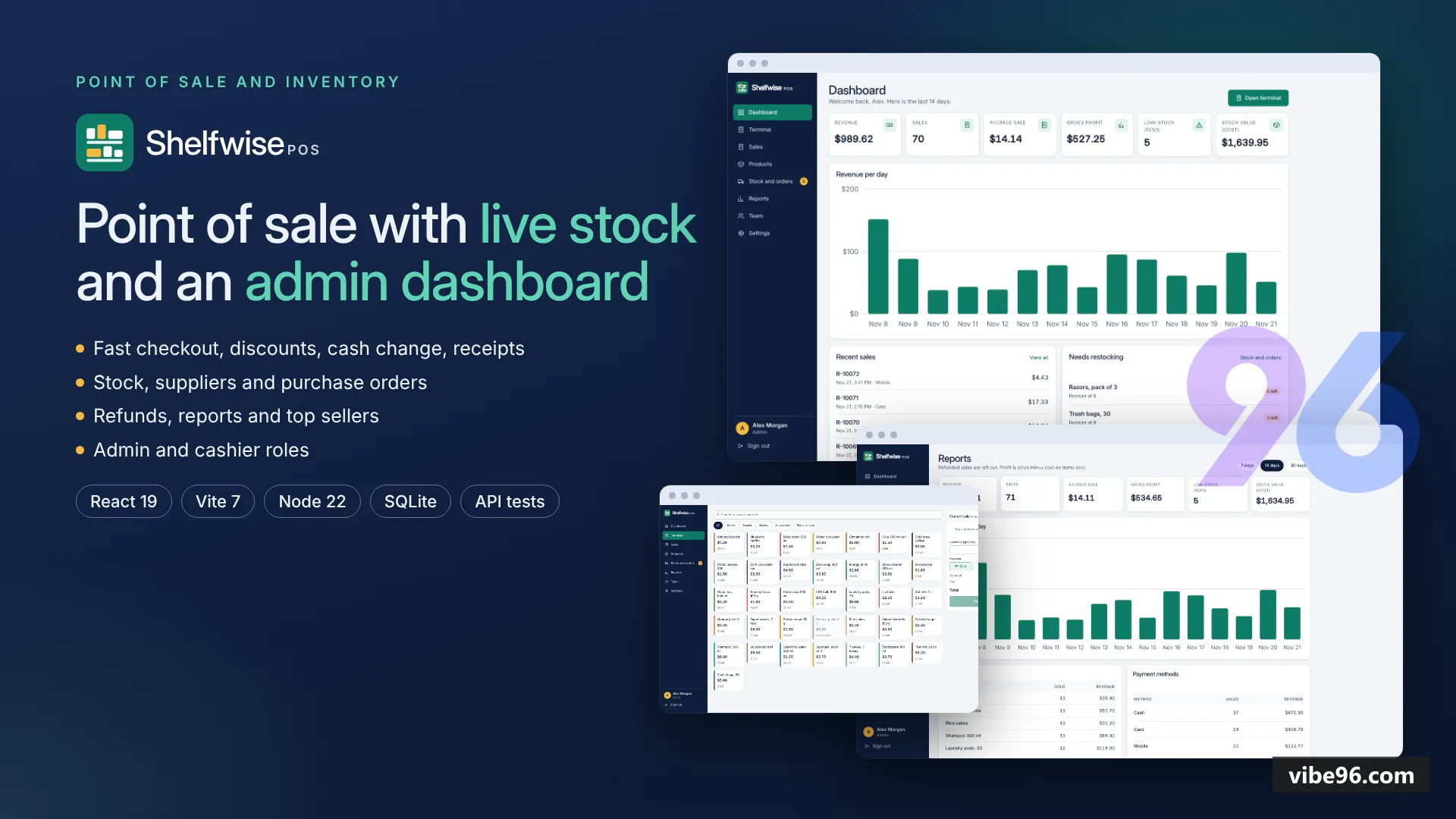
Shelfwise POS is a full-stack point of sale with a React 19 front end, a Node 22 API with no npm dependencies, and a SQLite database. Cashiers ring up sales on a terminal with search and barcode entry. Admins manage products, stock, suppliers, purchase orders, refunds, users and reports. Prices, tax, discounts and stock are decided on the server inside one transaction, and the browser sends only product ids and quantities. It has two roles (admin and cashier), a 28-test API suite according to the README, and ships with Docker, Render and Vercel configuration. Card payments are recorded as a method only, and no payment provider is integrated.
Why Shelfwise POS: Point of Sale and Inventory System
What makes it better
than the alternatives
- 01
Server-side pricing
The terminal sends only product ids and quantities, and priceSale() prices the basket from database values inside a transaction.
- 02
Stock audit trail
Every stock change (sale, refund, purchase, adjustment, initial) writes a stock_movements row, and the movement log is viewable per product.
- 03
Full purchasing loop
Admins create purchase orders for suppliers, then receive them (adds stock and updates product cost) or cancel them.
- 04
No server dependencies
The API uses built-in node:http, node:sqlite and node:crypto, so there are no server npm packages to audit or update.
- 05
Safe production defaults
DEMO_MODE is off by default, the first admin is created from environment variables, and no passwords are in the code; sessions use scrypt hashes, hashed tokens, HttpOnly cookies, CSRF origin checks and login rate limiting.
Sales terminal
- Product search by name
- SKU or barcode
- with a category filter
- Cart with quantity controls capped at stock
- Customer name and percentage discount (limits are set in config; the README states 10% for cashiers and 50% for admins)
- Cash with change due
- plus card and mobile payments recorded as a method only
- Printable receipt with receipt numbers (R-10000+)
Sales history and refunds
- Searchable history with a status filter
- Cashiers see only their own sales and admins see all
- Admin refund marks the sale refunded
- returns items to stock and logs the movement
- A sale cannot be refunded twice
Products and stock
- Create
- edit
- archive or delete products (deletion is refused when sales or orders exist)
- Per-product price
- cost
- tax rate
- reorder level
- barcode
- SKU
- category and supplier
- Manual stock adjustments with a note
- refused if stock would go below zero
- Low-stock list with reorder shortcut
Suppliers and purchasing
- Supplier directory with contact name
- email and phone
- Purchase orders with line items and unit costs
- with statuses ordered
- received and cancelled
- Receiving an order adds stock and updates product cost
- Suppliers with purchase orders cannot be deleted
Reports
- Admin summary for 1 to 90 days (the UI offers 7
- 14 or 30 per the README)
- Revenue and sales count per day
- plus totals for tax
- discounts
- gross profit and average sale
- Top 5 sellers and payment method mix
- Stock value and low-stock count
Team and access
- Two roles
- admin and cashier
- with a role check on every endpoint
- Admins add users
- change roles
- reset passwords and deactivate accounts
- Deactivation or a password reset ends that user's sessions at once
- Admins cannot demote or deactivate their own account
Security and platform
- scrypt password hashing and random session tokens stored as sha256
- In-memory rate limiting on login and on sale creation
- Security headers and an Origin check on state-changing requests
- Docker and docker-compose with a persistent volume
- plus Render and Vercel config
Demo, docs and tooling
- Optional demo mode with 36 sample products
- 72 sample sales and demo logins
- Admin button to restore demo data (demo mode only)
- Seed generator script (make_seed.py)
- Docs for API
- database
- ERD and customisation
- plus CLAUDE.md for AI coding tools
| Language | Version | Framework | Used for | Share of code |
|---|---|---|---|---|
| JavaScript (React) | — | — | Front-end | 34.7% |
| JavaScript | — | — | Front-end | 32.6% |
| SQL | — | — | Database | 15.8% |
| CSS | — | — | Styling | 11% |
| Python | — | — | Web, API | 3.2% |
| HTML | — | — | Front-end | 2.7% |
- Primary language
- JavaScript (ES modules), Node 22
- Framework
- React 19 + Vite 7 (front end); Node 22 node:http (API)
- Database
- SQLite via node:sqlite (Node 22.13+)
- Authentication
- Email and password (scrypt), random session tokens stored hashed, HttpOnly SameSite cookie; two roles: admin and cashier
- Licence
- Single-site
- Screens
- 12
- Database tables
- 11
- Supported languages
- English only; no RTL support
- Browser support
- Modern evergreen browsers (Chrome, Firefox, Safari, Edge); not tested in the digest
| Minimum | Recommended | |
|---|---|---|
| CPU | 1 vCPU | 2 vCPU |
| RAM | 512 MB | 1 GB |
| OS | Linux or Windows; Node.js 22.13 or later (Docker image uses Node 22.14.0 Alpine) | Linux or Windows; Node.js 22.13 or later (Docker image uses Node 22.14.0 Alpine) |
| Est. monthly hosting | $5 | $5 |
```
docker compose up -d --build
```
Copy .env.example to .env first and set ADMIN_EMAIL, ADMIN_PASSWORD, and DEMO_MODE=false for a real shop.
```
cd "React Web" && npm ci && npm run build
cd "../Node API" && DATABASE_PATH=data/shelfwise-pos.db node --env-file=../.env server/index.js
```
Serve on port 3000 behind an HTTPS reverse proxy and set COOKIE_SECURE=true and TRUST_PROXY=true.
Open the project folder and ask Claude Code to follow CLAUDE.md, then run `cd "Node API" && npm test` to check the 28 tests.
Quality report
Manually reviewedHow to read the quality report
What this is. Every project on Vibe96 goes through an automated audit of its source code before a reviewer in Dubai checks it by hand. The score is out of 100; 75 is the minimum to be listed, and any single failing check blocks a listing regardless of the score.
- Security
- No real credentials in the code, every data-changing route protected, admin areas role-gated, no SQL built from user input.
- Code structure
- A developer can navigate and extend it: clear module boundaries, no giant files, little copy-paste.
- Docs & completeness
- The setup guide, example config, schema and required files the builder committed to are actually in the archive.
- Dependency health
- Packages pinned, no known critical vulnerabilities, no abandoned libraries in production paths.
- Build & deploy
- A clean machine can restore, build and start it by following the shipped instructions.
Warnings are problems that didn't block the listing; they stay visible here until a later version clears them. The audit reads the code — it does not run it — so always try the live demo before you buy. Lines of code are counted from the same audited archive.
Versions & updates
No updates yet. New versions appear here with a changelog.
Buyers receive updates free for 1 year.
What you get
- </>Full source codeThe complete audited source, delivered as a download from your account. No obfuscation.
- ▤DocumentationSetup guide, architecture notes, CLAUDE.md and AGENTS.md.
- ↻One year of updatesEvery new version the builder publishes, free for 12 months.
- ♧30 days of supportInstallation and defect support through Vibe96 tickets.