 Built by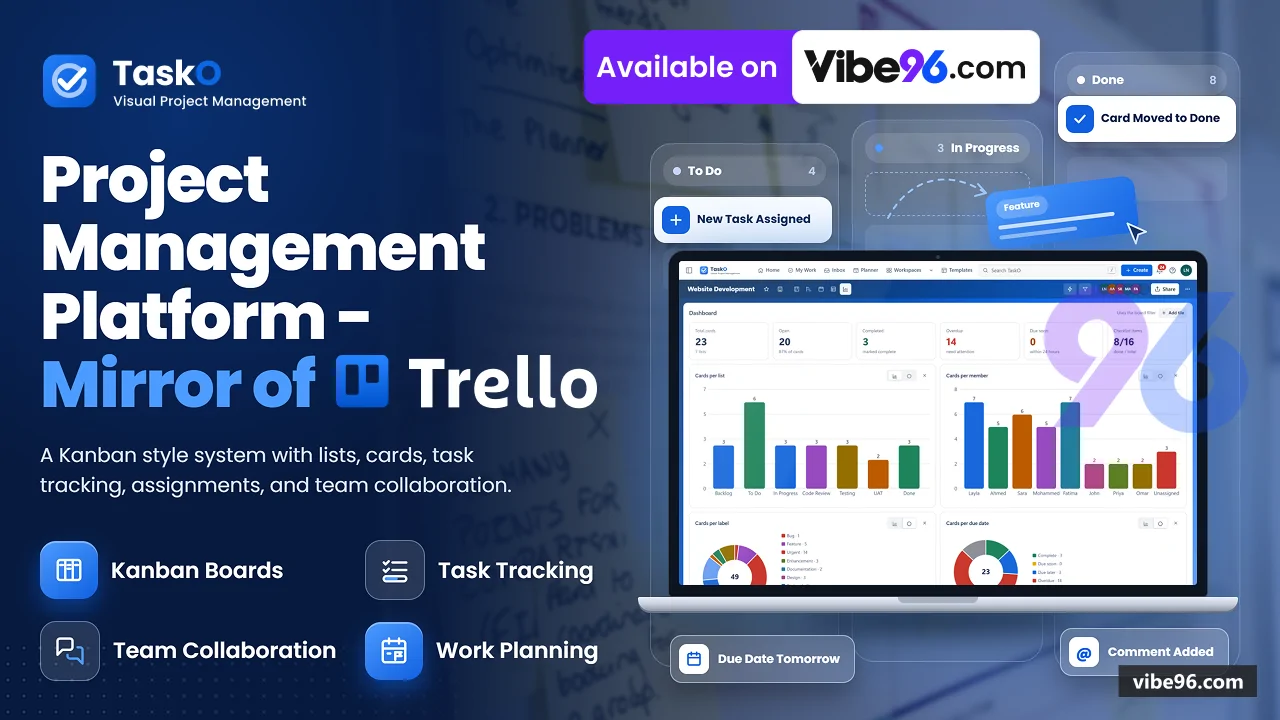
About this software
About TaskO
TaskO is a complete ASP.NET Core MVC project management application that runs on your own server with SQL Server. Teams organise work into Workspaces, boards, lists and cards, viewing the same data as Kanban boards, timelines, calendars, tables or dashboards. The system includes card templates, custom fields, checklists with per-item assignees, file attachments, automation rules with triggers and scheduled actions, and due-date reminders. All source code (C#, JavaScript, Razor views, SQL scripts) is included for a single-site deployment.
Why TaskO
What makes it better
than the alternatives
- 01
No build chain
- 02
Hand-written parameterised SQL over ADO.NET
With no ORM, every query visible in repository classes
- 03
Single-page bootstrap
- 04
Automation engine runs on card changes
And on schedule (once per minute) with triggers, conditions and actions stored as JSON in the database
- 05
File uploads stored outside web root under random
Names, served only to users who can see a board referencing them
Boards & Cards
- Drag-and-drop Kanban boards with lists and cards
- Quick composer with @member
- #label
- ^top shortcuts and date parsing
- Multi-select up to 20 cards with Shift
- bulk move or copy
- Card back with labels
- dates
- reminders
- repeats
- checklists
- members
- attachments
- custom fields
- covers
- stickers
- Markdown description editor
- comments with @mentions and emoji reactions
- Card types: plain card
- separator
- board link
- card link
- mirror (live reference to another card)
- List actions: copy
- move
- sort
- watch
- WIP limit
- colour
- archive
- Board and card templates
- archived items with restore
- close or delete board
Views
- Timeline with draggable bars
- zoom from day to year
- grouping by
list/member/label/duedate - Calendar in
month/week/daywith drag-to-reschedule and add-on-day - Table with inline editing of list
- labels
- members
- dates
- custom fields
- sorting and column selection
- Dashboard with KPI tiles
cards-per-list/member/label/due/priority- created vs completed trend
- Workspace-wide Table and Calendar across up to 20 boards
- Board filter panel with saved views
Automation & Scheduling
- AutomationEngine: pure
- diff-driven rule processor in
Infrastructure/Automation/ - Triggers: card created
- moved
- member added/removed
- label added/removed
- date set
- checklist item checked
- due soon
- overdue
- Conditions: list
- member
- label
- date range
- custom field value
- checklist progress
- Actions: move card
- add/remove member
- add/remove label
- set dates
- post comment
- send notification
- Scheduled automations run once per minute via SchedulerService (IHostedService)
- Button automations: manual trigger from card back
- runs immediately
- Run history per board with success/failure and error messages
Workspaces & Access
- Workspaces group boards
- each with members and roles (Admin
- Manager
- Member
- Guest)
- Board-level roles override Workspace roles: Admin
- Member
- Observer
- None
- System administrators (SystemAdmin role) see all boards
- manage users
- view audit log
- Personal data isolation: stars
- notifications
- inbox
- planner blocks
- saved searches
- views
- preferences all filtered by me.Id
- Workspace merge: moves all boards and members to target Workspace
- Export Workspace as ZIP of CSV and JSON files
Personal Planning
- Home screen with greeting
- Up Next (cards due today/tomorrow)
- Highlights feed with replies and reactions
- Inbox: personal card list with drag-to-reorder
- stored per user (OwnerId = me.Id)
- Planner: time-blocking calendar with draggable blocks
- stored per user
- Notifications with unread count
- mark read/unread
- filter by type
- Saved searches per board
- Workspace-wide views
- Recent boards list
- starred boards
Files & Attachments
- Upload to
App_Data/uploads/with random filenames - stored outside web root
- File signature checks (imageOnly flag) for avatars
- accepts
PNG/JPEG/GIF/WebP - Served at /
files/{month}/{name} only to users who can see a referencing board - Shared assets (avatars
- logos) allowed without board check
- Content-Security-Policy sandbox on file responses
- 400 MB request limit (configurable in web.config)
Authentication & Security
- Cookie authentication (CookieAuthenticationDefaults.AuthenticationScheme)
- session hours configurable
- Two-factor authentication with TOTP (Totp.cs generates secrets
- QR codes
- verifies codes)
- Security stamp in auth cookie ends other sessions when password or 2FA changes
- Account lockout after configurable failed attempts (default 5)
- administrator can reset
- Temporary password gate: users with MustChangePassword claim cannot access any page except /settings.html
- BCrypt password hashing
- timing equaliser for unknown accounts
- SessionValidator checks security stamp on every request
- signs out if changed
Administration
- User management: create
- update
- deactivate
- delete
- reset password
- reset 2FA
- System settings: lockout threshold
- TOTP issuer name
- time zone
- scheduler enable/disable
- Audit log with server-side search and paging (AuditRepository.SearchAsync)
- filters by
user/type/date/query - Role assignment: SystemAdmin
- Admin
- Manager
- Member
- Guest
- Workspace assignment on user creation
- All admin actions require SystemAdmin role (policy on AdminApiController)
Export & Reporting
- Board export as JSON
- CSV or PDF (ExportService)
- Workspace export as ZIP of CSV and JSON files for all visible boards
- Arabic language support in exports (checks user preference 'language')
- PDF generation with board title
- lists
- cards
- labels
- members
- dates
- CSV with one row per card
- all fields and custom fields as columns
Localisation
- Arabic UI translation (i18n.ar.js
- 172 KB
- 2
- 681 lines)
- User preference 'language' stored per user
- affects exports and UI
- RTL layout support in CSS (tokens.css
- app.css)
- Date formatting respects user locale
- Time zone configurable per installation (Flowboard:TimeZone in appsettings.json)
| Language | Version | Framework | Used for | Share of code |
|---|---|---|---|---|
| JavaScript | — | — | Front-end | 30.7% |
| C# | — | — | Web, API, admin | 30.2% |
| CSS | — | — | Styling | 14.8% |
| C# (Razor) | — | — | Web pages | 8.5% |
| SQL | — | — | Database | 8.2% |
| HTML | — | — | Front-end | 7.6% |
- Primary language
- C# 13 / .NET 10
- Framework
- ASP.NET Core 10 MVC
- Database
- SQL Server 2019
- Authentication
- Cookie authentication with optional TOTP two-factor
- Licence
- Single-site
- Screens
- 44
- Database tables
- 28
- Supported languages
- English, Arabic (RTL supported)
- Browser support
- Modern browsers (Chrome, Firefox, Safari, Edge)
| Minimum | Recommended | |
|---|---|---|
| CPU | 2 vCPU | 4 vCPU |
| RAM | 4 GB RAM / 20 GB storage | 8 GB RAM / 50 GB storage |
| OS | Windows Server 2019+ with IIS 10+, or Linux with Docker | Windows Server 2019+ with IIS 10+, or Linux with Docker |
| Est. monthly hosting | $25 | $25 |
```bash
cp docs/docker/.env.example .env
# Edit .env: set MSSQL_SA_PASSWORD and FLOWBOARD_DB_PASSWORD
# Edit docs/database/create-app-login.sql: match FLOWBOARD_DB_PASSWORD
docker compose up -d db
export MSSQL_SA_PASSWORD='<from .env>'
docker compose exec -T db /opt/mssql-tools18/bin/sqlcmd -S localhost -U sa -P "$MSSQL_SA_PASSWORD" -C -I -i /sql/schema.sql
docker compose exec -T db /opt/mssql-tools18/bin/sqlcmd -S localhost -U sa -P "$MSSQL_SA_PASSWORD" -C -I -i /sql-extra/create-app-login.sql
docker compose exec -T db /opt/mssql-tools18/bin/sqlcmd -S localhost -U sa -P "$MSSQL_SA_PASSWORD" -C -I -d Flowboard -i /sql/seed.sql
docker compose up -d app
# Open http://localhost:8080
```
```powershell
# Install .NET 10 Hosting Bundle from https://dotnet.microsoft.com/download
# Install SQL Server 2019+
sqlcmd -S localhost -E -I -f 65001 -i database\schema.sql
sqlcmd -S localhost -E -I -f 65001 -d Flowboard -i database\seed.sql
cd "NET Project\src\Flowboard"
dotnet publish -c Release -o C:\inetpub\flowboard
# Create IIS site pointing to C:\inetpub\flowboard
# Set environment variable ConnectionStrings__Flowboard in IIS app settings
# Grant IIS_IUSRS read/write on App_Data folder
iisreset
```
```bash
# Install .NET 10 SDK and SQL Server 2019+
sqlcmd -S localhost -E -I -f 65001 -i database/schema.sql
sqlcmd -S localhost -E -I -f 65001 -d Flowboard -i database/seed.sql
cd "NET Project/src/Flowboard"
dotnet user-secrets set "ConnectionStrings:Flowboard" "Server=.;Database=Flowboard;Integrated Security=True;TrustServerCertificate=True;Encrypt=True"
dotnet restore
dotnet run
# Open https://localhost:7180
```
Quality report
Manually reviewedHow to read the quality report
What this is. Every project on Vibe96 goes through an automated audit of its source code before a reviewer in Dubai checks it by hand. The score is out of 100; 75 is the minimum to be listed, and any single failing check blocks a listing regardless of the score.
- Security
- No real credentials in the code, every data-changing route protected, admin areas role-gated, no SQL built from user input.
- Code structure
- A developer can navigate and extend it: clear module boundaries, no giant files, little copy-paste.
- Docs & completeness
- The setup guide, example config, schema and required files the builder committed to are actually in the archive.
- Dependency health
- Packages pinned, no known critical vulnerabilities, no abandoned libraries in production paths.
- Build & deploy
- A clean machine can restore, build and start it by following the shipped instructions.
Warnings are problems that didn't block the listing; they stay visible here until a later version clears them. The audit reads the code — it does not run it — so always try the live demo before you buy. Lines of code are counted from the same audited archive.
Reviewer notes (3 minor)
Weak default passwords in documentation; no real credentials found; moderate code duplication and some oversized files; structure is sound but maintainability could improve; strong authentication and role checks; minor ownership gaps on personal data reads. None of these stop the software from working; the developer has been told and improvements come in a future update.
Versions & updates
Release historyCurrent version
Updates in the last 90 days
Buyers
Updates included
-
1.4.0 Version Current23 Oct 2026 ✓ Reviewed & audited
- Admin settings page and UAT fixes
-
1.3.0 Version 7 Oct 2026 ✓ Reviewed & audited
- Updated changes to UI
-
1.2.0 Version 7 Oct 2026 ✓ Reviewed & audited
- Project name changed from Flowboard to TaskO and logos and icons changed
-
1.0.0 First release 4 Oct 2026 ✓ Reviewed & audited
How updates work: versions add features and go through the full AI audit and human review. Patches are small fixes, audited and checked by a reviewer before release. Buyers get every update free for 1 year and are emailed the how-to-apply steps.
What you get
- </>Full source codeThe complete audited source, delivered as a download from your account. No obfuscation.
- ▤DocumentationSetup guide, architecture notes, CLAUDE.md and AGENTS.md.
- ↻One year of updatesEvery new version the builder publishes, free for 12 months.
- ♧30 days of supportInstallation and defect support through Vibe96 tickets.