 Built by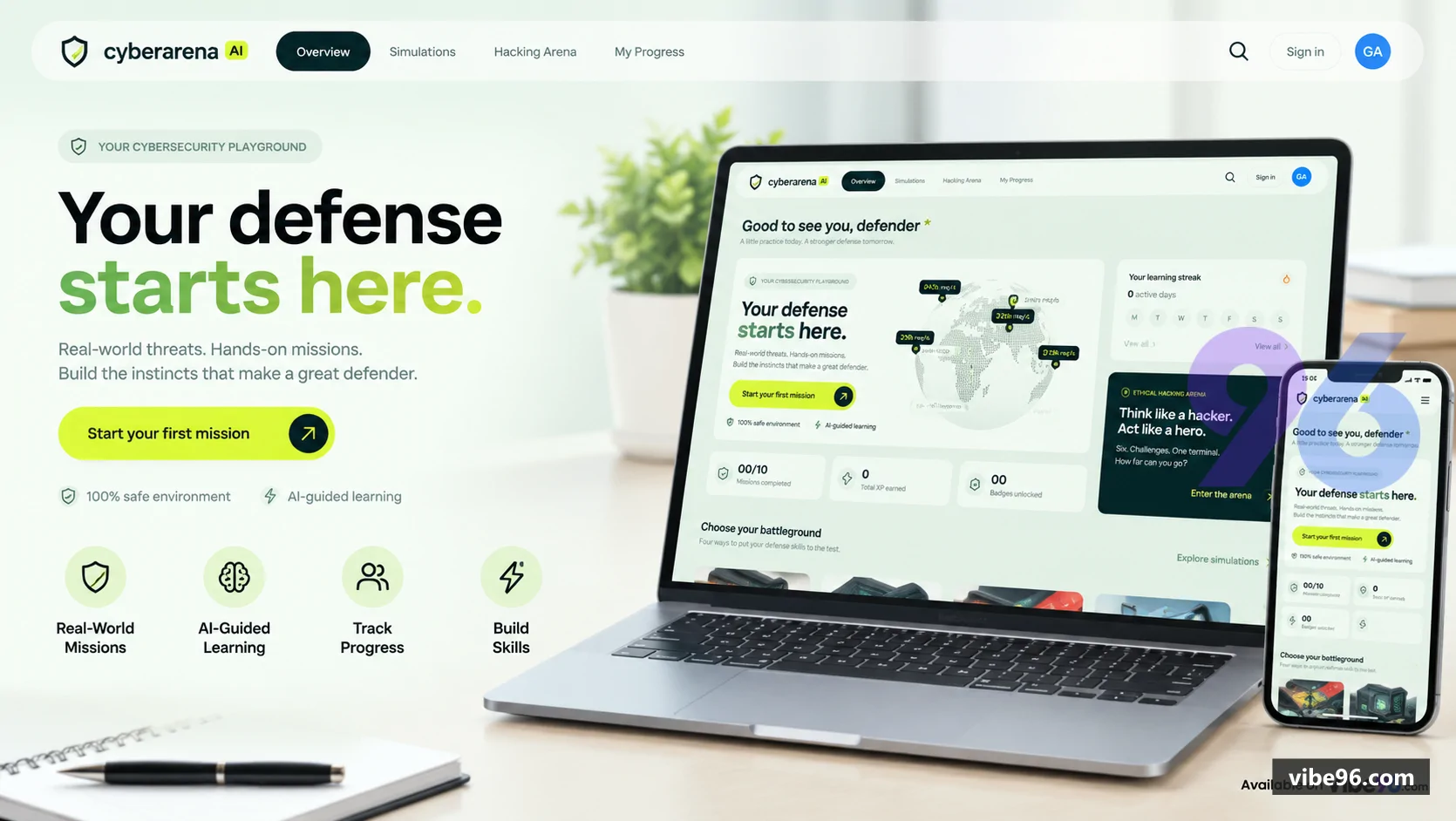
About this software
About CyberArena AI: Hands-On Cybersecurity Training Platform
CyberArena AI teaches cybersecurity through interactive defense simulations and ethical-hacking terminal challenges instead of dry theory. Learners work through four realistic attack scenarios (network intrusion, account takeover, ransomware, web app exploit) and six capture-the-flag terminal missions in a fully sandboxed environment. Progress is tracked with XP, badges, learning streaks and an interactive 3D activity skyline. Optional AI coaching provides contextual hints without requiring OpenAI availability. The platform includes role-based admin oversight, Google OAuth and email/password authentication, and responsive glass-style UI with full SEO metadata.
Why CyberArena AI: Hands-On Cybersecurity Training Platform
What makes it better
than the alternatives
- 01
Fully sandboxed terminal
- 02
AI-optional coaching
- 03
Activity skyline
- 04
Screenshot capture & explain
- 05
Role-protected admin dashboard
Defense Simulations
- 4 interactive missions: network intrusion
- account takeover
- ransomware recovery
- web app exploit
- Real-time incident feed with timed events and penalty scoring
- Multi-step objectives with progress tracking and completion validation
- Mission-specific hints and AI coaching context
- Restart and replay with score recalculation
Ethical Hacking Arena
- 6 capture-the-flag terminal challenges with deterministic flag validation
- Virtual filesystem with ls
- cat
- cd
- grep
- find
- help commands
- Command guide with one-click insertion into terminal
- Challenge-specific hints and AI coaching for stuck learners
- XP rewards scaled by attempt count (100 XP base
- -5 per wrong flag)
Progress & Gamification
- XP accumulation across all missions and challenges
- 4 mission-specific badges (Network Guardian
- Identity Protector
- Recovery Specialist
- Web Defender)
- Learning streak calculation from completion dates
- Interactive 3D activity skyline with yearly mission data
- Personal dashboard with stats
- next missions
- recent activity
Authentication & Roles
- Email/password and Google OAuth sign-in via Supabase Auth
- Guest mode with in-memory progress (no persistence)
- Role-based access control with public.user_roles table
- Admin role checked server-side via has_role RLS function
- Demo account seeded via SQL (no passwords in repository)
AI Coaching
- Optional OpenAI GPT-4.1-mini integration for contextual hints
- Server-side API key storage with authenticated server functions
- Per-user hourly rate limiting (process-local
- not distributed)
- Fallback to built-in hints when AI unavailable
- Mission/challenge-specific context passed to coaching prompts
Capture & Understand
- Screenshot capture of terminal state via html-to-image
- AI analysis of captured screen with mission context
- Works without AI (shows built-in hints only)
- Authenticated server function with rate limiting
- Contextual help based on current challenge objective
Admin Dashboard
- Read-only learner overview with completion records
- Aggregated stats: learner count
- total completions
- average score
- Per-learner mission/challenge breakdown with scores and dates
- Role-protected route with server-side requireAdmin guard
- RLS policies enforce admin-only read access to all user data
Data Persistence
- Supabase Postgres with training_progress table
- Owner-scoped RLS policies (users see only their own rows)
- Admin read-all policy via has_role RLS function
- Drizzle ORM schema with incremental migrations
- Authenticated server functions with explicit requireUser/requireAdmin guards
UI & Routing
- TanStack Start file-based routing with 8 pages (/
- /auth
- /dashboard
- /progress
- /activity
- /admin
- /simulations
- /arena)
- Responsive glass-style UI with Tailwind CSS v4 design tokens
- shadcn/ui primitives (buttons
- dialogs
- progress
- tabs
- etc.)
- SEO metadata on every route via TanStack head function
- 3D globe (cobe) and activity skyline (contribution-skyline) visualizations
| Language | Version | Framework | Used for | Share of code |
|---|---|---|---|---|
| TypeScript (React) | — | — | Front-end | 71.6% |
| TypeScript | — | — | Front-end | 19% |
| CSS | — | — | Styling | 7.2% |
| SQL | — | — | Database | 1.8% |
| JavaScript | — | — | Front-end | 0.3% |
- Primary language
- TypeScript 5.8
- Framework
- TanStack Start 1.168 (React 19)
- Database
- PostgreSQL 12+
- Authentication
- Supabase Auth (email/password, Google OAuth)
- Licence
- Single-site
- Screens
- 9
- Database tables
- 2
- Supported languages
- English only
- Browser support
- Modern browsers (Chrome 90+, Firefox 88+, Safari 14+, Edge 90+)
| Minimum | Recommended | |
|---|---|---|
| CPU | 1 vCPU | 2 vCPU |
| RAM | 1 GB | 2 GB |
| OS | Node.js 20+ or Bun 1.1+ | Node.js 20+ or Bun 1.1+ |
| Est. monthly hosting | $15 | $15 |
```bash
cd Project
cp .env.example .env
# Edit .env with your Supabase credentials
docker build -t cyberarena .
docker run -p 3000:3000 --env-file .env cyberarena
```
```bash
curl -fsSL https://bun.sh/install | bash
git clone <repo-url> cyberarena
cd cyberarena/Project
cp .env.example .env
# Edit .env with your Supabase credentials
bun install
bun run build
bun run preview --host 0.0.0.0 --port 3000
```
```bash
cd Project
cp .env.example .env
# Add environment variables in Cloudflare dashboard
bun install
bun run build
# Deploy .output/public to Cloudflare Pages
```
```bash
cd Project
cp .env.example .env
# Edit .env with your Supabase credentials
bun install
bun run dev
# Open http://localhost:3000
```
Quality report
Manually reviewedHow to read the quality report
What this is. Every project on Vibe96 goes through an automated audit of its source code before a reviewer in Dubai checks it by hand. The score is out of 100; 75 is the minimum to be listed, and any single failing check blocks a listing regardless of the score.
- Security
- No real credentials in the code, every data-changing route protected, admin areas role-gated, no SQL built from user input.
- Code structure
- A developer can navigate and extend it: clear module boundaries, no giant files, little copy-paste.
- Docs & completeness
- The setup guide, example config, schema and required files the builder committed to are actually in the archive.
- Dependency health
- Packages pinned, no known critical vulnerabilities, no abandoned libraries in production paths.
- Build & deploy
- A clean machine can restore, build and start it by following the shipped instructions.
Warnings are problems that didn't block the listing; they stay visible here until a later version clears them. The audit reads the code — it does not run it — so always try the live demo before you buy. Lines of code are counted from the same audited archive.
Reviewer notes (5 minor)
Lockfile present, no critical vulnerabilities, but several outdated dependencies; database rules mostly solid; missing indexes on foreign keys and no cascade rules; weak demo password ships to production; no real secrets found; moderate duplication and hard-coded values; some files could be split. None of these stop the software from working; the developer has been told and improvements come in a future update.
Versions & updates
No updates yet. New versions appear here with a changelog.
Buyers receive updates free for 1 year.
What you get
- </>Full source codeThe complete audited source, delivered as a download from your account. No obfuscation.
- ▤DocumentationSetup guide, architecture notes, CLAUDE.md and AGENTS.md.
- ↻One year of updatesEvery new version the builder publishes, free for 12 months.
- ♧30 days of supportInstallation and defect support through Vibe96 tickets.