 Built by
About this software
About Frigma – Design Tool
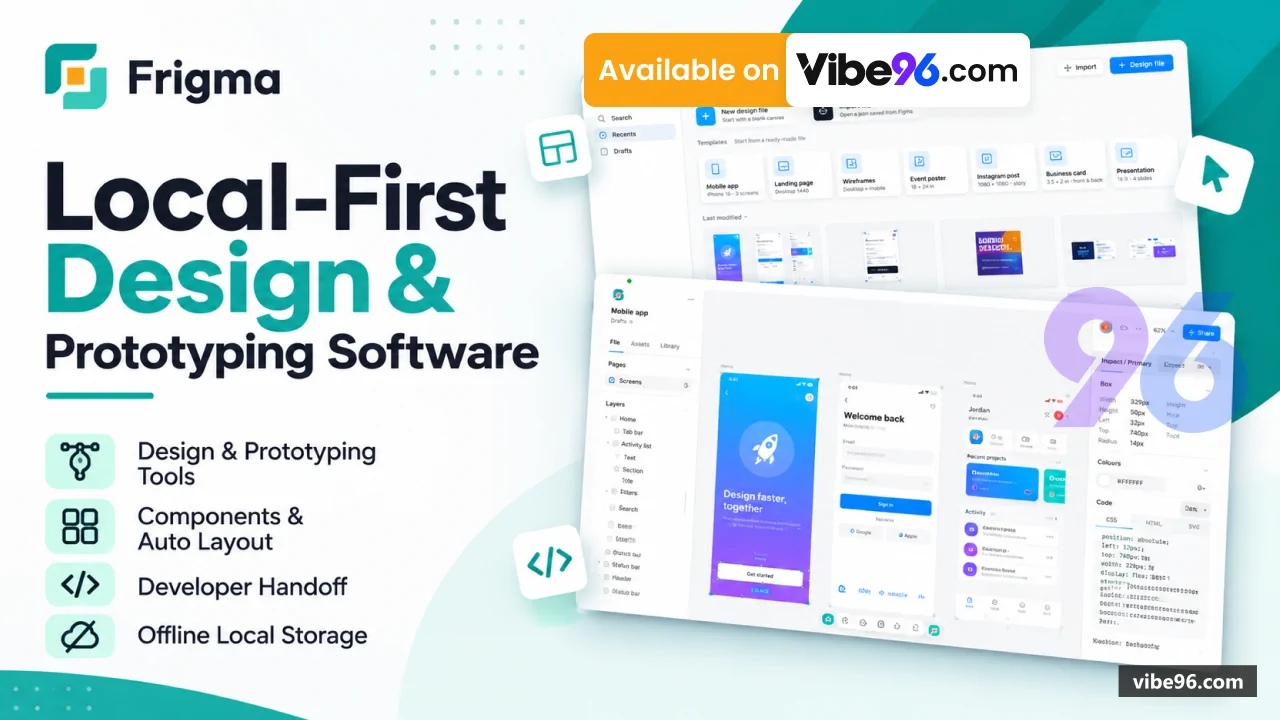
Frigma is a desktop design editor built with React 18, TypeScript and Electron, with no backend, database server, API or user accounts. Designs autosave to the app's local IndexedDB storage and can be exported as .json files for backup or sharing. The editor covers auto layout, components with variants, variables with modes, vector editing, prototyping, presentation mode and a Dev Mode that generates CSS and HTML. Source ships with Vitest tests, docs and electron-builder config for Windows (.exe) and macOS (.dmg) installers. Optional online extras (Google Fonts, Iconify, Openverse, Lorem Picsum, plugin import by URL) are described as failing quietly when offline.
Why Frigma – Design Tool
What makes it better
than the alternatives
- 01
Local-first and private
No backend, accounts or uploads; files live in the app's IndexedDB and export as .json.
- 02
Figma interoperability
Code includes Figma clipboard paste, .fig import and a Figma-compatible plugin API (pluginApi.ts, plugins.ts).
- 03
Hardened Electron shell
ContextIsolation, sandbox and webSecurity are on, nodeIntegration is off, and the preload exposes no IPC channels.
- 04
Built-in developer handoff
Dev Mode generates CSS and HTML+CSS (flexbox from auto layout); export covers PNG, JPG, WebP, SVG and multi-page PDF.
- 05
Maintainable codebase
TypeScript strict, exact-pinned dependencies, a 1,000-line file-size check, Vitest tests and docs for architecture and file format.
Design Canvas
- Canvas 2D renderer with hit testing
- Rulers
- measurement
- snapping and resize handling
- Drag-and-drop
- masks and re-parenting
- Rich text layout
Layout & Components
- Auto layout and constraints
- Components with instances
- variants and overrides
- Shared styles
- Variables with modes such as Light and Dark
Vector Tools
- Path editing with vector handles
- Boolean operations via polygon-clipping
- SVG import and export
Prototyping & Presentation
- Click
- hover and delay interactions
- Animated transitions and overlays
- Scrolling frames
- Full-screen presentation mode
Dev Mode & Export
- CSS
- HTML and SVG code generation
- Per-layer export settings
- PNG
- JPG
- WebP
- SVG and PDF export
- Zip export
File Management
- Home file browser with thumbnails
- Autosave 800 ms after edits
- Open and save .json files
- Version history and comments
Figma Compatibility
- Paste layers copied from Figma
- Import .fig files
- Run Figma-API plugins
- including import from a pasted link
Asset Library
- 80+ ready-made UI elements
- Starter templates and frame presets
- 1
- 700+ built-in Lucide icons
- 120 Google Fonts and uploaded fonts
- Optional Iconify
- Openverse and Picsum lookups
Desktop Packaging & Tests
- Electron main and preload for Windows and Mac
- electron-builder config for .exe and .dmg
- Vitest tests for model
- file round trip and export
- Docs: architecture
- file format
- dependencies
| Language | Version | Framework | Used for | Share of code |
|---|---|---|---|---|
| TypeScript | — | — | Front-end | 55.7% |
| TypeScript (React) | — | — | Front-end | 38.4% |
| CSS | — | — | Styling | 5.8% |
| HTML | — | — | Front-end | 0.1% |
- Primary language
- TypeScript 5.9 (Node.js 22.12+ to build)
- Framework
- React 18.3 + Electron 45 (Vite 8 build)
- Database
- IndexedDB in the local app (no server database)
- Authentication
- None: no accounts, logins or API keys
- Licence
- Single-site
- Screens
- 2
- Database tables
- 3
- Supported languages
- English UI; no other UI languages evidenced in the code. No RTL support.
- Browser support
- Desktop app runs in Electron's bundled Chromium. Browser build (npm run dev or /demo/) for Chromium-based browsers.
| Minimum | Recommended | |
|---|---|---|
| CPU | 2 vCPU | 4 vCPU |
| RAM | 4 GB RAM (estimate; not stated in code) | 8 GB RAM (estimate; not stated in code) |
| OS | Windows and macOS desktop. Electron 45; Node.js >=22.12 for building from source. | Windows and macOS desktop. Electron 45; Node.js >=22.12 for building from source. |
| Est. monthly hosting | $12 | $12 |
Open the `Frigma Desktop App/` folder and run:

```
npm ci
npm run dev        # browser dev server at http://localhost:5173
npm start          # build and open in Electron
npm test
```

If `npm start` fails with `Cannot find module 'electron'`, unset `ELECTRON_RUN_AS_NODE`.
```
npm ci
npm run dist:win   # release/Frigma-Setup-<version>.exe
npm run dist:mac   # release/Frigma-<version>-<arch>.dmg (macOS only)
```
```
npm ci
npm run build      # produces dist/index.html, one self-contained file
```

Upload `dist/index.html` to any static web host. It has no server-side parts.
Quality report
Manually reviewedHow to read the quality report
What this is. Every project on Vibe96 goes through an automated audit of its source code before a reviewer in Dubai checks it by hand. The score is out of 100; 75 is the minimum to be listed, and any single failing check blocks a listing regardless of the score.
- Security
- No real credentials in the code, every data-changing route protected, admin areas role-gated, no SQL built from user input.
- Code structure
- A developer can navigate and extend it: clear module boundaries, no giant files, little copy-paste.
- Docs & completeness
- The setup guide, example config, schema and required files the builder committed to are actually in the archive.
- Dependency health
- Packages pinned, no known critical vulnerabilities, no abandoned libraries in production paths.
- Build & deploy
- A clean machine can restore, build and start it by following the shipped instructions.
Warnings are problems that didn't block the listing; they stay visible here until a later version clears them. The audit reads the code — it does not run it — so always try the live demo before you buy. Lines of code are counted from the same audited archive.
89/ 100
Automated audit score
✓ Approved by our review teamReviewer notes (1 minor)
Small improvements the developer has been told about. None of them stop the software from working.
Versions & updates
No updates yet. New versions appear here with a changelog.
Buyers receive updates free for 1 year.
What you get
- </>Full source codeThe complete audited source, delivered as a download from your account. No obfuscation.
- ▤DocumentationSetup guide, architecture notes, CLAUDE.md and AGENTS.md.
- ↻One year of updatesEvery new version the builder publishes, free for 12 months.
- ♧30 days of supportInstallation and defect support through Vibe96 tickets.