 Built by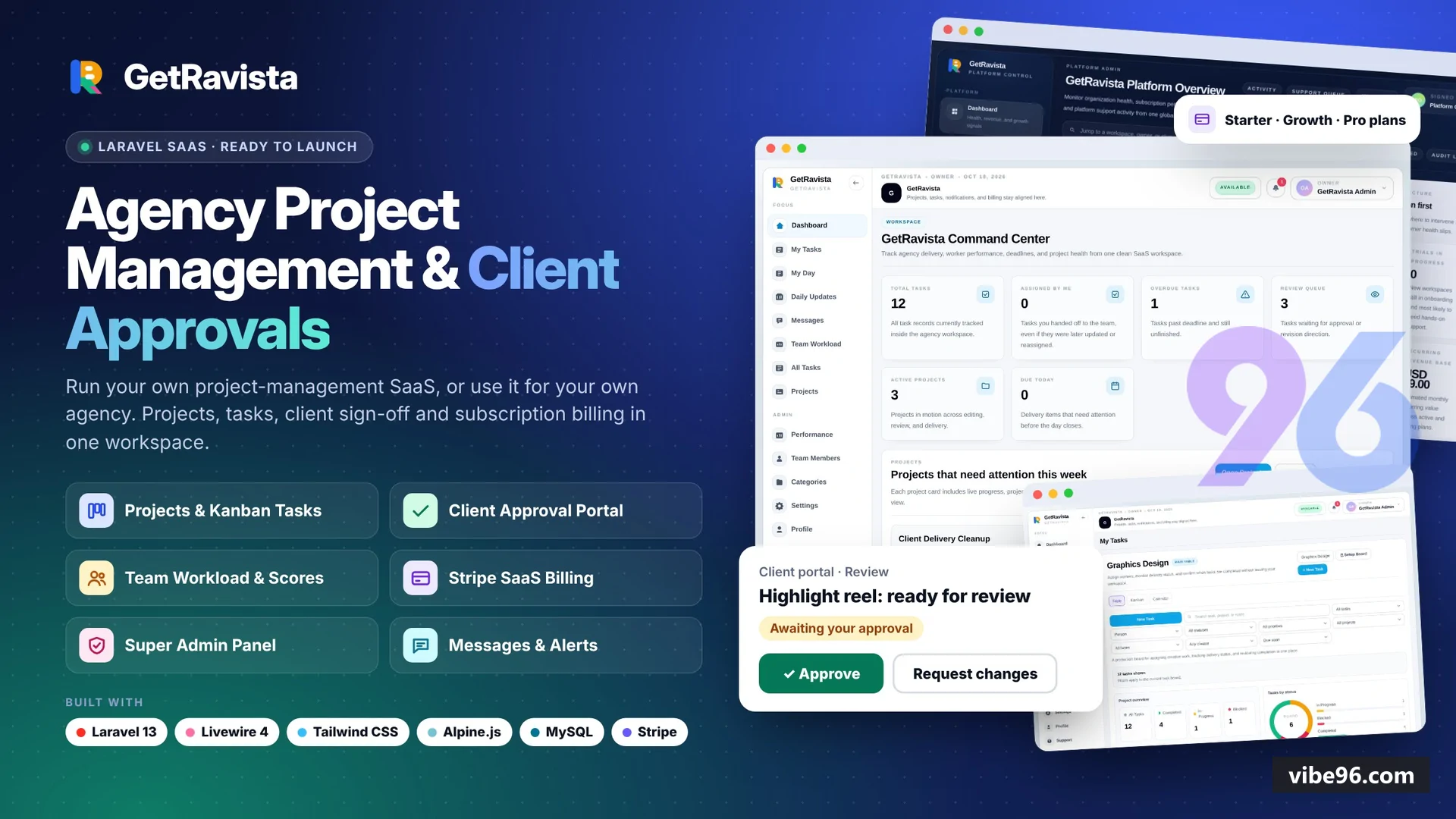
Why GetRavista: Agency Project Management & Client Approval SaaS
What makes it better
than the alternatives
- 01
Dual-mode architecture
Dual-mode architecture
- 02
Client approval workflow
Client approval workflow
- 03
Workspace isolation enforced
Workspace isolation enforced
- 04
Rebrandable from .env
Rebrandable from .env
- 05
Real-time messaging optional
Real-time messaging optional
Projects & Tasks
- Projects with lanes (Intake
- Editing
- Review
- Completed)
- scores
- budgets
- due dates and team assignments
- Task boards: table view
- kanban view
- calendar view with filters and saved views
- Tasks with assignees
- priorities
- statuses
- checklists
- attachments
- proof of completion and client ratings
- Recurring tasks
- reminders
- time tracking and bulk actions
- My Day planner and end-of-day daily updates for team members
- Team workload dashboard showing capacity and performance scores
Client Portal
- Clients see only projects
- files and deliverables explicitly shared with them
- Review requests with approve/request-changes buttons and timestamped approval records
- Public share links for projects (client_portal_token) with read-only access
- Client messaging linked to projects and tasks
- separate from internal team notes
- Client file library showing only attachments marked client-visible
- Client notifications index for review requests and project updates
Messaging & Notifications
- Conversations with participants
- priorities (low/normal/high/urgent)
- statuses (open/in_progress/resolved/closed)
- Messages with attachments
- edit history
- soft delete and real-time typing indicators (Reverb)
- Project conversation widget embedded in project detail pages
- Internal notes (is_internal flag) hidden from client participants
- In-app notification center and email notifications with per-user preferences
- Notification types: task assignments
- reviews
- messages
- project updates
- client joins
Team & Access Control
- Roles: owner
- admin
- manager
- member
- client with granular permissions
- Organization invitations by email with token-based acceptance flow
- Member directory with activation controls (is_active
- deactivated_at)
- Workspace memberships (organizationMemberships pivot) track role and join date per organization
- Client access service (ClientAccessService) enforces project visibility rules
- Policies for projects
- tasks
- conversations and messages checked on every write
SaaS Billing (SaaS mode)
- Stripe Checkout integration for Starter/Growth/Pro plans (monthly and yearly)
- Free trials (TRIAL_DAYS configurable
- soft/hard lock modes when expired)
- Plan limits enforced: seats
- projects
- storage GB
- client collaborators
- Stripe Customer Portal for self-service subscription management
- Webhook handler (StripeWebhookController) syncs checkout.session.completed
- invoice.paid
- customer.subscription.*
- Invoice history view showing past 24 invoices from Stripe API
Super Admin Panel (SaaS mode)
- Dashboard: MRR
- active subscriptions
- trial conversions
- user growth metrics
- Organizations index with search
- filters and subscription status
- Users index with impersonation (PlatformImpersonationService stores original user in session)
- Subscriptions index showing all Stripe subscriptions with plan and status
- Activity log (ActivityLogService) tracking workspace events: user joins
- plan changes
- project creates
- Support queue placeholder for future ticketing integration
Guest Workspaces (SaaS mode)
- Try-it-as-a-guest sandbox workspaces created without sign-up (FEATURE_GUEST_WORKSPACES)
- Guest token stored in cookie (GUEST_WORKSPACE_COOKIE) with 5-day expiry
- Rate limiting: max 3 attempts per 30 minutes per IP (GUEST_WORKSPACE_MAX_ATTEMPTS)
- Guest users can create projects
- tasks and messages in their sandbox
- Conversion flow: register account to save guest workspace data (GuestWorkspaceService::convertGuestWorkspaceToUser)
- Conversion intent tracking (billing
- upgrade
- premium_automations) redirects to appropriate page after sign-up
Onboarding & Setup
- Workspace setup wizard (WorkspaceSetup Livewire component) with steps: welcome
- team
- projects
- workflow
- Workflow presets: agency_review (default)
- software_dev
- content_production
- consulting
- Demo data seeder (DatabaseSeeder) creates team
- projects
- tasks
- conversations and client account
- One-command installer: php artisan getravista:install --demo
- Branding configuration from .env: APP_NAME
- BRAND_LOGO
- BRAND_FAVICON
- BRAND_ACCENT
- SUPPORT_EMAIL
- Onboarding completion tracking (onboarding_completed_at) with redirect middleware
Performance & Productivity
- Performance overview dashboard showing project scores
- task completion rates and team velocity
- Workload dashboard (WorkloadDashboard Livewire component) with capacity planning
- Daily updates feature for end-of-day summaries (DailyUpdates Livewire component)
- Task ratings (TaskRating model) for client feedback on completed work
- Project scores calculated from task completion
- budget adherence and client ratings (ProjectScoreService)
- Activity log for workspace events with actor
- action and metadata
| Language | Version | Framework | Used for | Share of code |
|---|---|---|---|---|
| PHP | — | — | Web, API | 96.1% |
| SQL | — | — | Database | 2.4% |
| JavaScript | — | — | Front-end | 0.9% |
| CSS | — | — | Styling | 0.6% |
- Primary language
- PHP 8.4
- Framework
- Laravel 13, Livewire 4
- Database
- MySQL 8 / MariaDB 10.6
- Authentication
- Laravel Breeze (session-based, email/password, password reset, email verification)
- Licence
- Single-site
- Screens
- 42
- Database tables
- 53
- Supported languages
- English only
- Browser support
- Modern browsers (Chrome, Firefox, Safari, Edge — ES6+, CSS Grid, Flexbox)
| Minimum | Recommended | |
|---|---|---|
| CPU | 1 vCPU | 2 vCPU |
| RAM | 2 GB RAM / 10 GB storage | 4 GB RAM / 20 GB storage |
| OS | PHP 8.4, Composer 2, Node.js 18+ (build only), MySQL 8 / MariaDB 10.6 | PHP 8.4, Composer 2, Node.js 18+ (build only), MySQL 8 / MariaDB 10.6 |
| Est. monthly hosting | $15 | $15 |
1. Upload files to `public_html/getravista` (or subdomain root)
2. Create MySQL database + user in cPanel
3. Copy `.env.example` to `.env`, set `APP_URL`, `DB_*`, `APP_MODE=saas` or `agency`
4. SSH or terminal: `cd public_html/getravista && composer install --no-dev --optimize-autoloader && php artisan key:generate && php artisan getravista:install --demo`
5. Point domain to `public/` (cPanel > Domains > document root)
6. Optional: `php artisan queue:work` as cron job every minute
```bash
sudo apt update && sudo apt install -y php8.4-cli php8.4-fpm php8.4-mysql php8.4-mbstring php8.4-xml php8.4-curl php8.4-zip composer nginx mysql-server
sudo mysql -e "CREATE DATABASE getravista; CREATE USER 'getravista'@'localhost' IDENTIFIED BY 'strong-password'; GRANT ALL ON getravista.* TO 'getravista'@'localhost'; FLUSH PRIVILEGES;"
cd /var/www && sudo git clone <repo-url> getravista && cd getravista
sudo chown -R www-data:www-data storage bootstrap/cache
cp .env.example .env
# Edit .env: APP_URL, DB_*, APP_MODE
composer install --no-dev --optimize-autoloader
php artisan key:generate
php artisan getravista:install --demo
# Configure Nginx to serve public/, enable PHP-FPM, restart nginx
sudo systemctl enable --now getravista-queue.service  # systemd unit for queue:work
```
```bash
# Dockerfile (add to project root):
FROM php:8.4-fpm
RUN apt-get update && apt-get install -y libzip-dev libpng-dev && docker-php-ext-install pdo_mysql zip gd
COPY --from=composer:2 /usr/bin/composer /usr/bin/composer
WORKDIR /var/www
COPY . .
RUN composer install --no-dev --optimize-autoloader && php artisan config:cache && php artisan route:cache && php artisan view:cache
CMD php artisan serve --host=0.0.0.0 --port=8000

# docker-compose.yml:
version: '3.8'
services:
  app:
    build: .
    ports: ['8000:8000']
    environment:
      DB_HOST: db
      DB_DATABASE: getravista
      DB_USERNAME: root
      DB_PASSWORD: secret
    depends_on: [db]
  db:
    image: mysql:8
    environment:
      MYSQL_ROOT_PASSWORD: secret
      MYSQL_DATABASE: getravista
    volumes: ['db-data:/var/lib/mysql']
volumes:
  db-data:

# Run:
docker-compose up -d
docker-compose exec app php artisan getravista:install --demo
``````bash composer install cp .env.example .env # Set DB_CONNECTION=sqlite, DB_DATABASE=/absolute/path/to/database/database.sqlite touch database/database.sqlite php artisan key:generate php artisan getravista:install --demo composer dev # runs server, queue, logs, Vite together # Open http://localhost:8000, sign in: admin@getravista.test / <password shown by installer> ```
Quality report
Manually reviewedHow to read the quality report
What this is. Every project on Vibe96 goes through an automated audit of its source code before a reviewer in Dubai checks it by hand. The score is out of 100; 75 is the minimum to be listed, and any single failing check blocks a listing regardless of the score.
- Security
- No real credentials in the code, every data-changing route protected, admin areas role-gated, no SQL built from user input.
- Code structure
- A developer can navigate and extend it: clear module boundaries, no giant files, little copy-paste.
- Docs & completeness
- The setup guide, example config, schema and required files the builder committed to are actually in the archive.
- Dependency health
- Packages pinned, no known critical vulnerabilities, no abandoned libraries in production paths.
- Build & deploy
- A clean machine can restore, build and start it by following the shipped instructions.
Warnings are problems that didn't block the listing; they stay visible here until a later version clears them. The audit reads the code — it does not run it — so always try the live demo before you buy. Lines of code are counted from the same audited archive.
88/ 100
Automated audit score
✓ Passed the auditReviewer notes (4 minor)
Dependencies mostly current; 3 npm packages with known advisories (moderate severity); several missing foreign key indexes and one unscoped delete; no injection found; strong auth guards on mutations; minor ownership gaps on read endpoints; weak demo password defaults and test credentials in code; moderate code duplication and some oversized components; structure is sound but maintainability could improve. None of these stop the software from working; the developer has been told and improvements come in a future update.
Versions & updates
No updates yet. New versions appear here with a changelog.
Buyers receive updates free for 1 year.
What you get
- </>Full source codeThe complete audited source, delivered as a download from your account. No obfuscation.
- ▤DocumentationSetup guide, architecture notes, CLAUDE.md and AGENTS.md.
- ↻One year of updatesEvery new version the builder publishes, free for 12 months.
- ♧30 days of supportInstallation and defect support through Vibe96 tickets.