 Built by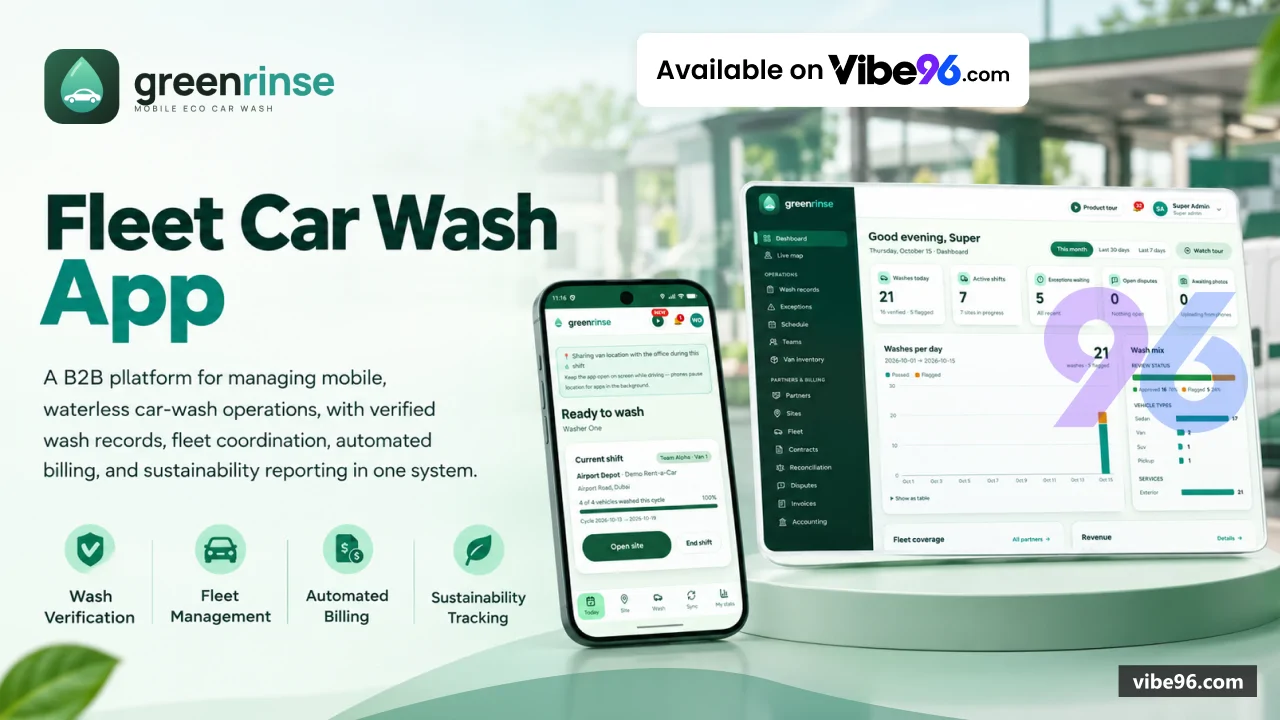
Why GreenRinse
What makes it better
than the alternatives
- 01
Offline-first washer PWA
Records and photos queue on the phone and sync when the connection returns, with Dexie and Workbox service worker.
- 02
Automatic verification
Every wash is checked for geofence compliance, timing, duplicate plates and photo quality (blur, darkness); optional AI cleanliness score and damage detection.
- 03
Reconciliation engine
Import the partner's CSV/Excel report and match it line by line against wash records to catch discrepancies before invoicing.
- 04
Multi-provider AI
Plate recognition, vehicle classification, cleanliness scoring and damage detection with pluggable providers (PlateRecognizer.com, Claude Vision, Codex, Antigravity).
- 05
Full accounting sync
Push invoices and credit notes to Xero or QuickBooks Online via OAuth2, with a sync log and retry queue.
Washer App (PWA)
- Offline-first wash recording: plate (typed or AI-read)
- before/after photos
- GPS
- geofence check
- Photo quality checks: blur
- darkness
- duplicate detection; optional AI cleanliness score and damage detection
- Daily route with ETAs
- van stock tracking
- multi-language UI (English
- Arabic
- Hindi
- Urdu
- Bengali
- Tagalog)
- PIN login on remembered devices
- Web Push notifications
- installable as native app
Admin Dashboard
- Master data: partners
- contracts with price matrices
- sites with geofences
- fleet vehicles
- vans
- teams
- users (8 roles: SuperAdmin
- RegionalManager
- OperationsSupervisor
- Finance
- TeamLead
- Washer
- PartnerAdmin
- PartnerViewer)
- Verification queue: automatic checks (geofence
- timing
- duplicate plates
- photo quality) with exceptions list and manual override
- Live map of vans with real-time tracking
- route planning
- schedules and SLA tracking with missed-visit alerts
- Billing: invoices
- credit notes
- PDF generation
- Xero and QuickBooks Online sync
- Reports: performance
- sustainability/ESG (water saved
- CO₂ avoided)
- scheduled e-mail delivery
- Settings: branding (logo
- colours
- company details)
- e-mail/SMS/Web Push notifications
- AI providers
- Stripe/Twilio connection tests
- database backup and data clean-up
- Guided product tours (Tour.tsx) inside every screen
Partner Portal
- Per-partner view of wash records with photos
- invoices
- disputes and fleet list
- Partner API (PartnerApiV1Controller): REST endpoints with per-partner API keys (grk_… prefix) and HMAC-signed webhooks
- API scopes: read-only
- write (create wash records)
- webhooks; documented in docs/partner-api.md
Reconciliation
- Import partner reports (CSV/Excel) and match line by line against wash records
- Discrepancy detection: missing washes
- extra charges
- date/plate mismatches
- Reconciliation periods with status tracking (Open
- Reconciled
- Disputed
- Closed)
- Dispute workflow: partner can flag items
- admin resolves with notes
AI & Photo Processing
- Plate recognition: PlateRecognizer.com API
- Claude Vision
- manual mode; confidence threshold and region filtering
- Vehicle classification: PlateRecognizer.com
- Claude Vision
- Codex API; detects type (sedan
- SUV
- truck
- van
- motorcycle) and colour
- Cleanliness scoring: Claude Vision
- Antigravity API; 0-100 score with before/after comparison
- Damage detection: Claude Vision
- Codex API; identifies scratches
- dents
- broken parts with bounding boxes
- Photo quality checks: blur detection (Laplacian variance)
- darkness (histogram)
- duplicate detection (perceptual hash)
- SkiaSharp image processing: thumbnail generation
- EXIF stripping
- format conversion
Notifications
- E-mail: SMTP or SendGrid API; templates for invoices
- SLA alerts
- verification failures
- SMS: Twilio API; OTP
- wash confirmations
- alerts
- Web Push: VAPID-signed notifications to washer PWA and admin dashboard; NotificationsHub (SignalR) for real-time delivery
- Notification preferences per user: e-mail
- SMS
- push toggles; admin can test each channel from Settings
Accounting Integration
- Xero: OAuth2 connect
- push invoices/credit notes
- sync log with retry queue
- QuickBooks Online: OAuth2 connect
- push invoices/credit notes
- sync log with retry queue
- Accounting sync log: tracks every push attempt
- error messages
- retry count
- Settings: per-provider client ID/secret
- tax rates
- default accounts; documented in docs/accounting-integration.md
Tracking & Scheduling
- Van tracking: GPS breadcrumbs (TrackingPoint entity)
- live map with van icons and routes
- Route planning: assign sites to vans
- calculate ETAs
- detect geofence entry/exit
- Schedules: recurring visits (daily
- weekly
- monthly)
- SLA tracking with missed-visit alerts
- Inventory: van stock (chemicals
- towels
- equipment)
- usage tracking
- low-stock alerts
Security & Multi-Tenancy
- JWT authentication: access + refresh token rotation
- 8 roles with 12 policies (Policies.cs)
- PIN login on remembered devices (Device entity
- per-user PIN hash)
- API key authentication: grk_… keys for partner API
- HMAC-signed webhooks
- Row-level security: tenant/partner/country scoping in QueryFilters.cs
- soft delete
- Secret protection: Data Protection API for settings (SecretProtector.cs)
- never logs secrets
- Rate limiting: global 600/min
- API 120/min
- auth endpoints throttled
Reports & Sustainability
- Performance reports: washes per washer/van/partner
- revenue
- SLA compliance
- Sustainability/ESG: water saved (vs traditional wash)
- CO₂ avoided
- eco-friendly product usage
- PDF generation: invoices
- credit notes
- wash certificates with branding
- Excel export: wash records
- reconciliation
- fleet lists
- Scheduled reports: e-mail delivery on cron schedule (Hangfire jobs)
| Language | Version | Framework | Used for | Share of code |
|---|---|---|---|---|
| C# | — | — | Web, API, admin | 77.7% |
| TypeScript (React) | — | — | Front-end | 11.6% |
| SQL | — | — | Database | 4.4% |
| TypeScript | — | — | Front-end | 2.2% |
| CSS | — | — | Styling | 1.6% |
| HTML | — | — | Front-end | 1.3% |
| Python | — | — | Web, API | 0.8% |
| JavaScript | — | — | Front-end | 0.3% |
| Shell | — | — | Scripts | 0.2% |
| PowerShell | — | — | Scripts | 0% |
- Primary language
- C# 13 / .NET 10
- Framework
- ASP.NET Core 10 + React 18.3 + TypeScript 5.9
- Database
- SQL Server 2019+
- Authentication
- JWT (access + refresh tokens, rotation) with PIN login on remembered devices; API keys (HMAC-signed) for partner API
- Licence
- Single-site
- Screens
- 42
- Database tables
- 47
- Supported languages
- English, Arabic, Urdu, Hindi, Bengali, Tagalog (6 languages; RTL supported)
- Browser support
- Chrome/Edge/Safari/Firefox (last 2 versions); iOS Safari 14+, Android Chrome 90+
| Minimum | Recommended | |
|---|---|---|
| CPU | 2 vCPU | 4 vCPU |
| RAM | 4 GB RAM / 20 GB SSD | 8 GB RAM / 50 GB SSD |
| OS | Linux (Ubuntu 22.04+) or Windows Server 2019+; .NET 10 SDK; Node.js 22+; SQL Server 2019+ or Azure SQL | Linux (Ubuntu 22.04+) or Windows Server 2019+; .NET 10 SDK; Node.js 22+; SQL Server 2019+ or Azure SQL |
| Est. monthly hosting | $85 | $85 |
```bash
# 1. Copy .env.example to .env and set MSSQL_SA_PASSWORD, JWT_SECRET
cp .env.example .env

# 2. Start SQL Server + API + frontend build
docker-compose up -d

# 3. API runs on http://localhost:5000; built frontends in storage/www/
# Serve storage/www/ with nginx (see deploy/nginx.conf) or copy to a CDN
```
```bash
# 1. Install .NET 10, Node 22, SQL Server 2019 (or use Azure SQL)
wget https://packages.microsoft.com/config/ubuntu/22.04/packages-microsoft-prod.deb
sudo dpkg -i packages-microsoft-prod.deb
sudo apt update && sudo apt install -y dotnet-sdk-10.0 nginx
curl -fsSL https://deb.nodesource.com/setup_22.x | sudo -E bash -
sudo apt install -y nodejs

# 2. Clone repo, set connection string + secrets as environment variables
export ConnectionStrings__Default="Server=localhost;Database=GreenRinse;User Id=sa;Password=<pw>;Encrypt=True;TrustServerCertificate=True"
export Jwt__Secret="$(openssl rand -base64 48)"
export SEED_DEMO_DATA=true

# 3. Build API
cd "NET Project/backend/src/GreenRinse.Api"
dotnet publish -c Release -o /var/www/greenrinse-api

# 4. Build frontends
cd ../../../frontend
npm ci
VITE_API_URL=https://yourdomain.com npm run build:site
# Outputs to apps/*/dist; copy to /var/www/greenrinse-www

# 5. Install systemd service (see deploy/greenrinse-api.service)
sudo cp deploy/greenrinse-api.service /etc/systemd/system/
sudo systemctl enable --now greenrinse-api

# 6. Configure nginx (see deploy/nginx.conf) and restart
sudo cp deploy/nginx.conf /etc/nginx/sites-available/greenrinse
sudo ln -s /etc/nginx/sites-available/greenrinse /etc/nginx/sites-enabled/
sudo systemctl restart nginx
```
```bash
# 1. Create Azure SQL database, note connection string
az sql db create --resource-group <rg> --server <server> --name GreenRinse --service-objective S1

# 2. Create App Service (Linux, .NET 10)
az webapp create --resource-group <rg> --plan <plan> --name greenrinse-api --runtime "DOTNETCORE:10.0"

# 3. Set app settings (connection string, JWT secret, CORS origins)
az webapp config appsettings set --resource-group <rg> --name greenrinse-api --settings \
  ConnectionStrings__Default="<azure-sql-connection-string>" \
  Jwt__Secret="$(openssl rand -base64 48)" \
  Cors__AllowedOrigins="https://yourdomain.com" \
  SEED_DEMO_DATA=true

# 4. Deploy API from local publish folder
cd "NET Project/backend/src/GreenRinse.Api"
dotnet publish -c Release -o ./publish
cd publish && zip -r ../api.zip . && cd ..
az webapp deployment source config-zip --resource-group <rg> --name greenrinse-api --src api.zip

# 5. Build frontends with VITE_API_URL=https://greenrinse-api.azurewebsites.net
cd ../../../frontend
VITE_API_URL=https://greenrinse-api.azurewebsites.net npm run build:site
# Deploy apps/*/dist to Azure Static Web Apps or CDN
```
```powershell
# 1. Install .NET 10 Hosting Bundle, Node 22, SQL Server 2019
# Download from https://dotnet.microsoft.com/download/dotnet/10.0

# 2. Create IIS site, set connection string in web.config or environment
# See deploy/web.config for ASP.NET Core Module v2 config

# 3. Publish API to IIS folder
cd "NET Project\backend\src\GreenRinse.Api"
dotnet publish -c Release -o C:\inetpub\greenrinse-api

# 4. Build frontends
cd ..\..\..\frontend
npm ci
$env:VITE_API_URL="https://yourdomain.com"; npm run build:site
# Copy apps/*/dist to C:\inetpub\greenrinse-www

# 5. Configure IIS: API site on port 5000, static site with deploy/spa-web.config for SPA routing
```
Quality report
Manually reviewedHow to read the quality report
What this is. Every project on Vibe96 goes through an automated audit of its source code before a reviewer in Dubai checks it by hand. The score is out of 100; 75 is the minimum to be listed, and any single failing check blocks a listing regardless of the score.
- Security
- No real credentials in the code, every data-changing route protected, admin areas role-gated, no SQL built from user input.
- Code structure
- A developer can navigate and extend it: clear module boundaries, no giant files, little copy-paste.
- Docs & completeness
- The setup guide, example config, schema and required files the builder committed to are actually in the archive.
- Dependency health
- Packages pinned, no known critical vulnerabilities, no abandoned libraries in production paths.
- Build & deploy
- A clean machine can restore, build and start it by following the shipped instructions.
Warnings are problems that didn't block the listing; they stay visible here until a later version clears them. The audit reads the code — it does not run it — so always try the live demo before you buy. Lines of code are counted from the same audited archive.
90/ 100
Automated audit score
✓ Passed the auditReviewer notes (4 minor)
Outdated dependencies present; no critical vulnerabilities detected; weak default secrets in example files; no real credentials found; strong auth/authz with minor ownership gaps on read endpoints; build reproducible with gaps: missing npm workspace config, unclear frontend build order; moderate duplication and some oversized files; business logic mostly well-layered but frontend has scattered concerns.. None of these stop the software from working; the developer has been told and improvements come in a future update.
Versions & updates
No updates yet. New versions appear here with a changelog.
Buyers receive updates free for 1 year.
What you get
- </>Full source codeThe complete audited source, delivered as a download from your account. No obfuscation.
- ▤DocumentationSetup guide, architecture notes, CLAUDE.md and AGENTS.md.
- ↻One year of updatesEvery new version the builder publishes, free for 12 months.
- ♧30 days of supportInstallation and defect support through Vibe96 tickets.