 Built by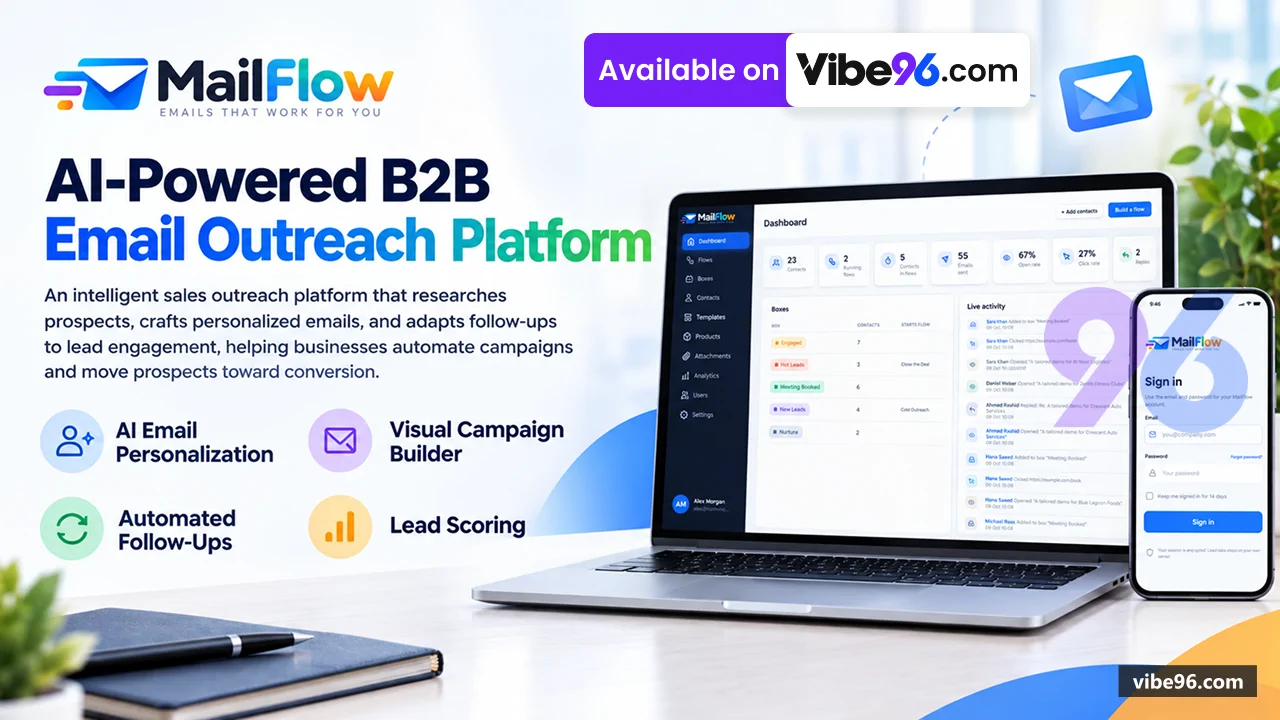
About this software
About MailFlow AI Campaign Platform
MailFlow automates outbound prospecting by researching each lead with Claude AI, writing personalised emails, tracking engagement (opens, clicks, replies), and moving contacts through sales stages automatically. Built on .NET 10 / ASP.NET Core 10 with SQL Server, it runs as a single self-hosted web application with a visual flow builder, template editor, contact management, and analytics. The platform handles research caching, business-hours scheduling, lead scoring, unsubscribe compliance, and multi-step campaigns from one drag-and-drop canvas. Every email is tracked with open pixels and click redirects; replies trigger webhooks to advance contacts through boxes (stages) that chain flows together.
Why MailFlow AI Campaign Platform
What makes it better
than the alternatives
- 01
AI Research Per Contact
Claude researches each lead from their website and optional web search, caches results for N days, and feeds findings into every email
- 02
Visual Flow Builder with Live Metrics
Drag-and-drop canvas with 7 step types (Box, AI Research, Email, Wait, Condition, Lead Score, End) showing real-time counts, open rates and click rates on every step
- 03
Boxes as Sales Stages
Contacts move between boxes (Cold Outreach → Hot Leads → Close the Deal) with flows starting automatically when a contact enters a box
- 04
AI-Written Emails with Context
Claude writes each email from your instructions, the research, and the full conversation history including how the contact reacted to earlier messages
- 05
Single .NET Application
Razor Pages UI, JSON API, and background flow engine in one ASP.NET Core 10 process on SQL Server; no microservices, no separate queue
Flow Builder
- Drag-and-drop canvas with 7 step types: Box
- AI Research
- Wait
- Condition (Yes/No)
- Lead Score
- End
- Live counts on every step: contacts on it now
- sent
- open rate
- click rate
- Validation before start
- zoom/fit
- duplicate flow
- Run or pause each flow; paused flows freeze every contact where it is
- FlowEngine background service advances due enrollments step by step every 15 seconds (configurable)
- FlowGraph parses Drawflow JSON definitions and validates node connections
AI Research & Email Writing
- ClaudeAiService calls Anthropic Messages API (claude-sonnet-5-5) with optional web_search tool (up to 5 uses per research)
- ResearchService caches results per contact for N days
- re-uses for multiple emails
- EmailComposer writes emails from instructions
- tone
- research
- and conversation history (earlier emails + reactions)
- Demo mode with placeholder text when Ai:ApiKey is empty
- Research fields defined per AI Research step; results stored in Contacts.ResearchJson
- Ai:CompanyContext setting provides company description for every email
Email Templates & Sending
- Visual template editor (TemplateDesign service) with drag-and-drop blocks
- or raw HTML mode
- Merge fields: {{first_name}}
- {{company}}
- {{email}}
- {{custom_field_1..5}}
- {{unsubscribe_url}}
- Product cards with image
- name
- description
- price
- button (Products table
- many-to-many EmailProducts)
- Tracked buttons and links (TrackingService rewrites URLs to /
t/c/{id} click redirects) - Attachments (EmailAttachments table
- files in App_Data/attachments)
- SmtpEmailSender (System.Net.Mail.SmtpClient
- STARTTLS on 587) or Pickup mode (writes .eml files to App_Data/outbox)
- Business-hours scheduling: Schedule:TimeZone
- BusinessDays
- BusinessHourStart/End
- Retry on failure (EmailLogs.Status:
Pending/Sent/Failed - RetryCount)
Tracking & Engagement
- Open pixel: /
t/o/{id}.gif (1×1 transparent GIF - logs EmailOpens with IP
- user-agent
- timestamp)
- Click tracking: /
t/c/{id} redirects to original URL - logs EmailClicks
- Reply webhook: POST /
api/inbound/replywith X-Webhook-Secret header (App:InboundSecret) - logs EmailReplies
- Stop-on-reply: flow pauses contact when reply is received
- One-click unsubscribe: /
u/{token} page - List-Unsubscribe and List-Unsubscribe-Post headers (RFC 8058)
- TrackingService handles all tracking endpoints
- updates Contacts.LastEngagement
Boxes & Lead Stages
- Boxes table: Id
- Name
- Description
- Color
- IsEntry
- IsArchive
- FlowId (auto-start flow when contact enters)
- BoxService.MoveContact moves contacts between boxes
- starts flows automatically
- Entry boxes: flows start from contacts in these boxes
- Archive boxes: contacts moved here are excluded from new flows
- Box step in flow builder moves contact to another box (triggers chained flows)
- ContactBoxes table tracks current box per contact
- moved timestamp
Contacts & Import
- Contacts table: Email (unique)
- FirstName
- LastName
- Company
- Website
- CustomField1..5
- ResearchJson
- LeadScore
- LastEngagement
- IsUnsubscribed
- Paging and search on /Contacts
Pages/Contacts/Index.cshtml.cs - CSV and Excel (.xlsx) import with SpreadsheetReader service (EPPlus library for .xlsx)
- Downloadable sample files: contacts-sample.csv
- contacts-sample.xlsx (wwwroot/samples)
- Contact details page with journey view: flow diagram with path taken
- chain of flows
- timeline of
emails/opens/clicks/replies/research - Journey view
Pages/Contacts/Details.cshtmlrenders Drawflow canvas with contact's path highlighted
Analytics & Reporting
- Dashboard
Pages/Index.cshtml: total contacts - active flows
- emails sent today
- open rate
- click rate
- reply rate
- Analytics page
Pages/Analytics.cshtml: per-flow and per-email-step metrics (sent - opens
- clicks
- replies
- rates)
- EmailLogs table: every email sent with Status
- SentAt
- OpenedAt
- ClickedAt
- RepliedAt
- EmailOpens
- EmailClicks
- EmailReplies tables: multiple events per email with timestamps
- IP
- user-agent
- FlowEnrollments table: contact's journey through a flow (CurrentNodeId
- Status:
Active/Completed/Paused - EnrolledAt
- CompletedAt)
- Live counts on flow builder steps (query FlowEnrollments + EmailLogs)
Users & Security
- Cookie authentication (CookieAuthenticationDefaults.AuthenticationScheme)
- login at /Login
Pages/Account/Login.cshtml - Users table: Email (unique)
- PasswordHash (PBKDF2
- 100k iterations
- 32-byte salt)
- FailedLoginAttempts
- LockedUntil
- LastPasswordChange
- UserService: CreateUser
- ValidatePassword
- LockAccount (Auth:MaxFailedLogins
- Auth:LockoutMinutes)
- Session timeout: Auth:SessionHours (default 8)
- remember-me: Auth:RememberMeDays (default 14)
- Sign-out everywhere on password change (LastPasswordChange check in cookie validation)
- Every page requires signed-in user unless [AllowAnonymous]; API routes need X-MailFlow-Request: 1 header
- Antiforgery tokens on all forms
- validated automatically by ASP.NET Core
- Security headers: CSP (script-src 'self' 'unsafe-inline'
- style-src 'self' 'unsafe-inline')
- X-Frame-Options: SAMEORIGIN
- X-Content-Type-Options: nosniff
- Referrer-Policy: strict-origin-when-cross-origin
- HSTS in production (Strict-Transport-Security: max-age=31536000; includeSubDomains)
- First admin created from Auth:AdminEmail
- Auth:AdminName
- Auth:AdminPassword when Users table is empty
Settings & Branding
- Settings page
Pages/Settings.cshtml: company name - sender name
- company address
- from email
- reply-to
- time zone
- business days/hours
- Logo upload (Assets page
Pages/Assets/Index.cshtml: replaces default logo in email templates and UI- App:PublicBaseUrl: base URL for tracking links
- click redirects
- unsubscribe page
- App:EnableSimulation: shows Sim open / Sim click / Skip wait test buttons in flow builder (development only)
- Email:Mode: Pickup (writes .eml files) or Smtp (really sends)
- Ai:ApiKey: empty = demo mode with placeholder research and email text
- Schedule:TimeZone
- BusinessDays (Mon
- Tue
- Wed
- Thu
- Fri)
- BusinessHourStart/End (9-18)
Compliance & Unsubscribe
- Unsubscribe page: /
u/{token}Pages/Unsubscribe.cshtml - sets Contacts.IsUnsubscribed = true
- List-Unsubscribe header: <mailto:...>
- <https://
.../u/{token}> - List-Unsubscribe-Post header: One-Click=List-Unsubscribe (RFC 8058)
- Company address in every email footer (App:CompanyAddress)
- Stop-on-reply: flow pauses contact when EmailReplies.RepliedAt is set
- Placeholder-identity warning: Settings page shows warning if company
name/address/fromemail are still default values - IsUnsubscribed contacts excluded from new flow enrollments (FlowEngine.EnrollContacts)
| Language | Version | Framework | Used for | Share of code |
|---|---|---|---|---|
| JavaScript | — | — | Front-end | 40.4% |
| CSS | — | — | Styling | 22% |
| C# | — | — | Web, API, admin | 21.6% |
| C# (Razor) | — | — | Web pages | 7.3% |
| HTML | — | — | Front-end | 4% |
| SQL | — | — | Database | 2.8% |
| Python | — | — | Web, API | 1.8% |
| Shell | — | — | Scripts | 0.1% |
- Primary language
- C# 10
- Framework
- ASP.NET Core 10
- Database
- SQL Server 2019
- Authentication
- Cookie authentication with PBKDF2 password hashing
- Licence
- Single-site
- Screens
- 18
- Database tables
- 14
- Supported languages
- English only
- Browser support
- Modern browsers (Chrome, Firefox, Edge, Safari)
| Minimum | Recommended | |
|---|---|---|
| CPU | 2 vCPU | 4 vCPU |
| RAM | 4 GB RAM / 20 GB storage | 8 GB RAM / 50 GB storage |
| OS | Windows Server 2019+ with IIS 10+ or Linux with .NET 10 runtime | Windows Server 2019+ with IIS 10+ or Linux with .NET 10 runtime |
| Est. monthly hosting | $25 | $25 |
```bash
cp .env.example .env
# Edit .env and fill in all REQUIRED values
docker compose up -d --build
# Open http://localhost:8080
```
```bash
# Install .NET 10 SDK
wget https://dot.net/v1/dotnet-install.sh
chmod +x dotnet-install.sh
./dotnet-install.sh --channel 10.0

# Install SQL Server 2019+ or use remote instance
# Create database from database/schema.sql
sqlcmd -S localhost -U sa -P 'YourPassword' -C -f 65001 -i database/schema.sql

# Build and run
cd "NET Project/src/MailFlow"
dotnet publish -c Release -o /var/www/mailflow
cd /var/www/mailflow

# Set environment variables or use appsettings.Production.json
export ConnectionStrings__MailFlow="Server=localhost;Database=MailFlow;User Id=mailflow_app;Password=YourPassword;TrustServerCertificate=True"
export Auth__AdminPassword="YourAdminPassword"
export ASPNETCORE_URLS="http://0.0.0.0:5000"

dotnet MailFlow.dll
```
```powershell
# Install .NET 10 Hosting Bundle from https://dotnet.microsoft.com/download/dotnet/10.0
# Install SQL Server 2019+ locally or use remote instance
# Create database from database\schema.sql
sqlcmd -S localhost -E -C -f 65001 -i database\schema.sql

# Build
cd "NET Project\src\MailFlow"
dotnet publish -c Release -o C:\inetpub\mailflow

# Create IIS site pointing to C:\inetpub\mailflow
# Set application pool to "No Managed Code"
# Configure appsettings.Production.json or environment variables
# Ensure App_Data folder has write permissions for IIS_IUSRS
```
```bash
# Install SQL Server locally or use Docker
docker run -e "ACCEPT_EULA=Y" -e "MSSQL_SA_PASSWORD=YourStrong@Password" -p 1433:1433 -d mcr.microsoft.com/mssql/server:2022-latest

# Create database
sqlcmd -S localhost -U sa -P 'YourStrong@Password' -C -f 65001 -i database/schema.sql
sqlcmd -S localhost -U sa -P 'YourStrong@Password' -C -f 65001 -i database/seed.sql

# Run application
cd "NET Project/src/MailFlow"
dotnet run

# Open https://localhost:5001
# Sign in with [email protected] / password from Auth:AdminPassword in appsettings.json
```
Quality report
Manually reviewedHow to read the quality report
What this is. Every project on Vibe96 goes through an automated audit of its source code before a reviewer in Dubai checks it by hand. The score is out of 100; 75 is the minimum to be listed, and any single failing check blocks a listing regardless of the score.
- Security
- No real credentials in the code, every data-changing route protected, admin areas role-gated, no SQL built from user input.
- Code structure
- A developer can navigate and extend it: clear module boundaries, no giant files, little copy-paste.
- Docs & completeness
- The setup guide, example config, schema and required files the builder committed to are actually in the archive.
- Dependency health
- Packages pinned, no known critical vulnerabilities, no abandoned libraries in production paths.
- Build & deploy
- A clean machine can restore, build and start it by following the shipped instructions.
Warnings are problems that didn't block the listing; they stay visible here until a later version clears them. The audit reads the code — it does not run it — so always try the live demo before you buy. Lines of code are counted from the same audited archive.
Reviewer notes (4 minor)
No real credentials found; weak default admin password in appsettings.json; strong authentication on all mutating endpoints; minor ownership gaps on read-only contact/flow details; no foreign keys, several unindexed foreign-key columns, one unscoped delete risk; moderate code duplication and some oversized files; generally sound module boundaries. None of these stop the software from working; the developer has been told and improvements come in a future update.
Versions & updates
Release historyCurrent version
Updates in the last 90 days
Buyers
Updates included
-
1.3.0 Version Current19 Oct 2026 ✓ Reviewed & audited
- Security updates
-
1.0.0 First release 12 Oct 2026 ✓ Reviewed & audited
How updates work: versions add features and go through the full AI audit and human review. Patches are small fixes, audited and checked by a reviewer before release. Buyers get every update free for 1 year and are emailed the how-to-apply steps.
What you get
- </>Full source codeThe complete audited source, delivered as a download from your account. No obfuscation.
- ▤DocumentationSetup guide, architecture notes, CLAUDE.md and AGENTS.md.
- ↻One year of updatesEvery new version the builder publishes, free for 12 months.
- ♧30 days of supportInstallation and defect support through Vibe96 tickets.