 Built by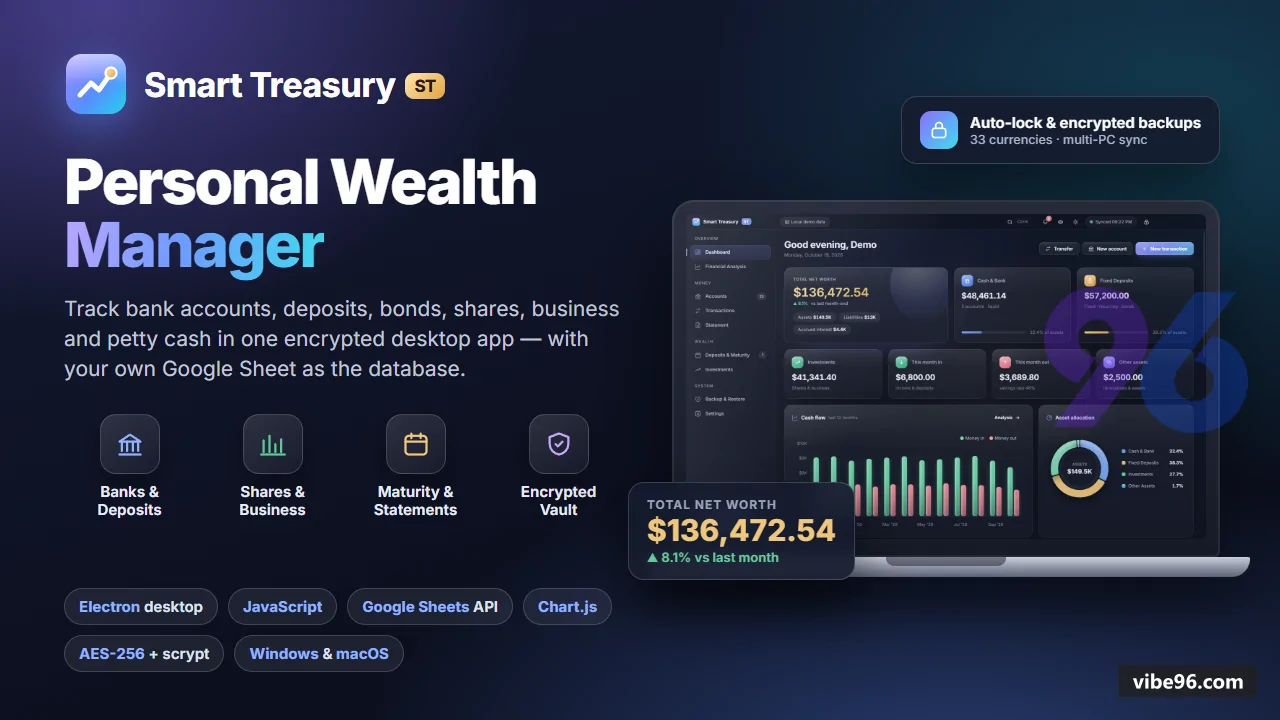
Why Smart Treasury
What makes it better
than the alternatives
- 01
User-owned data
User-owned data
- 02
Multi-computer sync
Multi-computer sync
- 03
Master-password vault
Master-password vault
- 04
Real financial maths
Real financial maths
- 05
Local where it matters
Local where it matters
Accounts
- 12 account types: bank
- recurring deposit (DPS)
- fixed deposit/CD (FDR)
- savings bond (Sanchayapatra)
- brokerage (share)
- business
- petty cash
- cash
- mobile wallet
- receivable
- other asset
- loan
- Each account stores bank name
- branch
- account number
- holder
- nominee
- opening date and balance
- interest rate
- compounding frequency
- tenure
- installment
- maturity date
- maturity amount (bank's figure or auto-calculated)
- tax withheld
- card colour
- Account groups for organising (e.g. 'Family'
- 'Business') with group-level balance totals
- Account detail screen shows running balance
- recent transactions
- maturity countdown (for deposits)
- holdings and gains (for shares)
Transactions
- Deposits
- withdrawals
- income
- expenses
- interest
- dividends
- fees
- tax
- adjustments
- Transfers between user's own accounts (deposit installments and loan payments included); transfers never counted as income or expense
- Each transaction has account
- date
- amount
- direction (in/out)
- category
- description
- optional transfer link
- Transactions created by share trades have link_id to the trade record
- Filter by account
- date range
- category
- direction; search by description
Statement
- Any account
- account group or account type
- for any date range
- Shows opening balance
- running balance per transaction
- total credit and debit
- closing balance
- Exports to PDF
- Excel (.xlsx) or print
- Statement generation uses dependency-free .xlsx writer (ZIP + SpreadsheetML) in
src/main/xlsx.js
Deposits & Maturity
- Countdown to each maturity (recurring deposits
- fixed deposits
- savings bonds)
- Expected vs bank-quoted maturity amount
- with compound interest calculation (daily
- monthly
- quarterly
- half-yearly
- yearly compounding)
- Tax withheld on interest (configurable rate per account)
- Accrued interest to date for each deposit
- Maturity badge in sidebar when any deposit matures within 30 days
Investments (Shares)
- Share buy/sell log in Trades table; holdings and average cost derived from it
- Latest traded price per symbol in Prices table (manual entry or paste from broker)
- Realised gains (from closed positions) and unrealised gains (from open holdings)
- Holdings screen shows symbol
- quantity
- average cost
- current price
- market value
- gain/loss
- gain %
- Investments screen aggregates all brokerage accounts with total market value and total gain
Financial Analysis
- Net worth trend (monthly snapshots over 12 months)
- Income vs expenses (monthly bar chart)
- Account-type breakdown (pie chart: bank
- deposits
- shares
- business
- cash
- loans)
- Top income and expense categories (bar charts)
- All charts use Chart.js 4.5.1 with custom theme (chart-theme.js) matching app light/dark mode
Backup & Restore
- Automatic daily backup of encrypted vault + offline cache to local backup folder (default: 7 backups kept)
- Manual backup on demand (exports vault + cache as .stbackup file)
- Restore from any .stbackup file (replaces current vault and cache
- requires master password)
- Backup folder location shown in settings; reveal in file manager button
- Backup payload includes vault (encrypted Google connection)
- offline cache (last synced data)
- lockout state
Security & Session
- Master password encrypts Google service-account key and Sheet link (AES-256-GCM
- scrypt key derivation with N=32768
- r=8
- p=1)
- Session auto-locks after 15 minutes idle (configurable 5–60 min) or when OS locks
- Unlock throttled to one attempt per second; 5 wrong attempts in 60 s → 60 s lockout (exponential backoff)
- Access control enforced in main process: while locked
- no data channel answers (ipc.js ACCESS.SESSION
- ACCESS.VAULT levels)
- Activity log (Log table) records logins
- password changes
- backups
- restores
- important edits with timestamp and description
- Password strength meter on setup and change-password screens; optional password hint (stored unencrypted)
Google Sheets Integration
- Database is user's own Google Sheet: one tab per table (Accounts
- Transactions
- Trades
- Prices
- Settings
- Log)
- row 1 = column names
- column A = record id
- Service-account OAuth (RS256 JWT
- google-auth.js) with token refresh 5 min before expiry
- SheetsClient (sheets.js) ensures missing tabs/headers on first connect
- reads all rows
upserts/removes/replacesrows via Sheets v4 REST API- Offline cache (last synced data) in local data folder; app works offline with read-only mode until connection returns
- Sync on demand (refresh button) or automatic on data change; conflict detection (server wins
- local changes rejected with warning)
Settings & Preferences
- Currency (33 built in: USD
- EUR
- GBP
- INR
- BDT
- PKR
- LKR
- NPR
- AED
- SAR
- etc.; or type custom symbol)
- Number grouping: International (1
- 234
- 567) or South Asian (12
- 34
- 567)
- Banking terms: International (fixed deposit
- recurring deposit
- savings bond
- brokerage account) or South Asian (FDR
- DPS
- Sanchayapatra
- BO account)
- Theme: light
- dark or system (persisted in localStorage; applies to window title bar on Windows)
- Privacy mode: hides all amounts and balances (toggle with Ctrl+H or eye icon in title bar)
- Auto-lock timeout (5–60 minutes)
- backup retention (1–30 days)
- Change master password (requires current password); reset connection (removes vault
- cache
- lockout file; Google Sheet untouched)
| Language | Version | Framework | Used for | Share of code |
|---|---|---|---|---|
| JavaScript | — | — | Front-end | 81.4% |
| CSS | — | — | Styling | 10.6% |
| SQL | — | — | Database | 6.4% |
| HTML | — | — | Front-end | 1.5% |
- Primary language
- JavaScript (Node.js 20.18+)
- Framework
- Electron 44.9.0
- Database
- Google Sheets (via REST API v4)
- Authentication
- Master password (scrypt + AES-256-GCM)
- Licence
- Single-site
- Screens
- 9
- Database tables
- 6
- Supported languages
- 33 built-in currencies, International/South Asian banking terms, number grouping (1,234,567 or 12,34,567)
- Browser support
- Chromium 132 (Electron embedded)
| Minimum | Recommended | |
|---|---|---|
| CPU | 2 vCPU | 2 vCPU |
| RAM | 2 GB RAM / 500 MB disk | 4 GB RAM / 1 GB disk |
| OS | Windows 10+ or macOS 11+, Electron 44 (Node.js 20.18, Chromium 132) | Windows 10+ or macOS 11+, Electron 44 (Node.js 20.18, Chromium 132) |
| Est. monthly hosting | $24 | $24 |
Quality report
Manually reviewedHow to read the quality report
What this is. Every project on Vibe96 goes through an automated audit of its source code before a reviewer in Dubai checks it by hand. The score is out of 100; 75 is the minimum to be listed, and any single failing check blocks a listing regardless of the score.
- Security
- No real credentials in the code, every data-changing route protected, admin areas role-gated, no SQL built from user input.
- Code structure
- A developer can navigate and extend it: clear module boundaries, no giant files, little copy-paste.
- Docs & completeness
- The setup guide, example config, schema and required files the builder committed to are actually in the archive.
- Dependency health
- Packages pinned, no known critical vulnerabilities, no abandoned libraries in production paths.
- Build & deploy
- A clean machine can restore, build and start it by following the shipped instructions.
Warnings are problems that didn't block the listing; they stay visible here until a later version clears them. The audit reads the code — it does not run it — so always try the live demo before you buy. Lines of code are counted from the same audited archive.
Reviewer notes (1 minor)
Dependencies pinned in lockfile; electron 44.9.0 and chart.js 4.5.1 are outdated; moderate code duplication and some oversized files; structure is sound but maintainability could improve. None of these stop the software from working; the developer has been told and improvements come in a future update.
Versions & updates
No updates yet. New versions appear here with a changelog.
Buyers receive updates free for 1 year.
What you get
- </>Full source codeThe complete audited source, delivered as a download from your account. No obfuscation.
- ▤DocumentationSetup guide, architecture notes, CLAUDE.md and AGENTS.md.
- ↻One year of updatesEvery new version the builder publishes, free for 12 months.
- ♧30 days of supportInstallation and defect support through Vibe96 tickets.