About this software
About WorksheetWiz – AI Worksheet Generator for Teachers
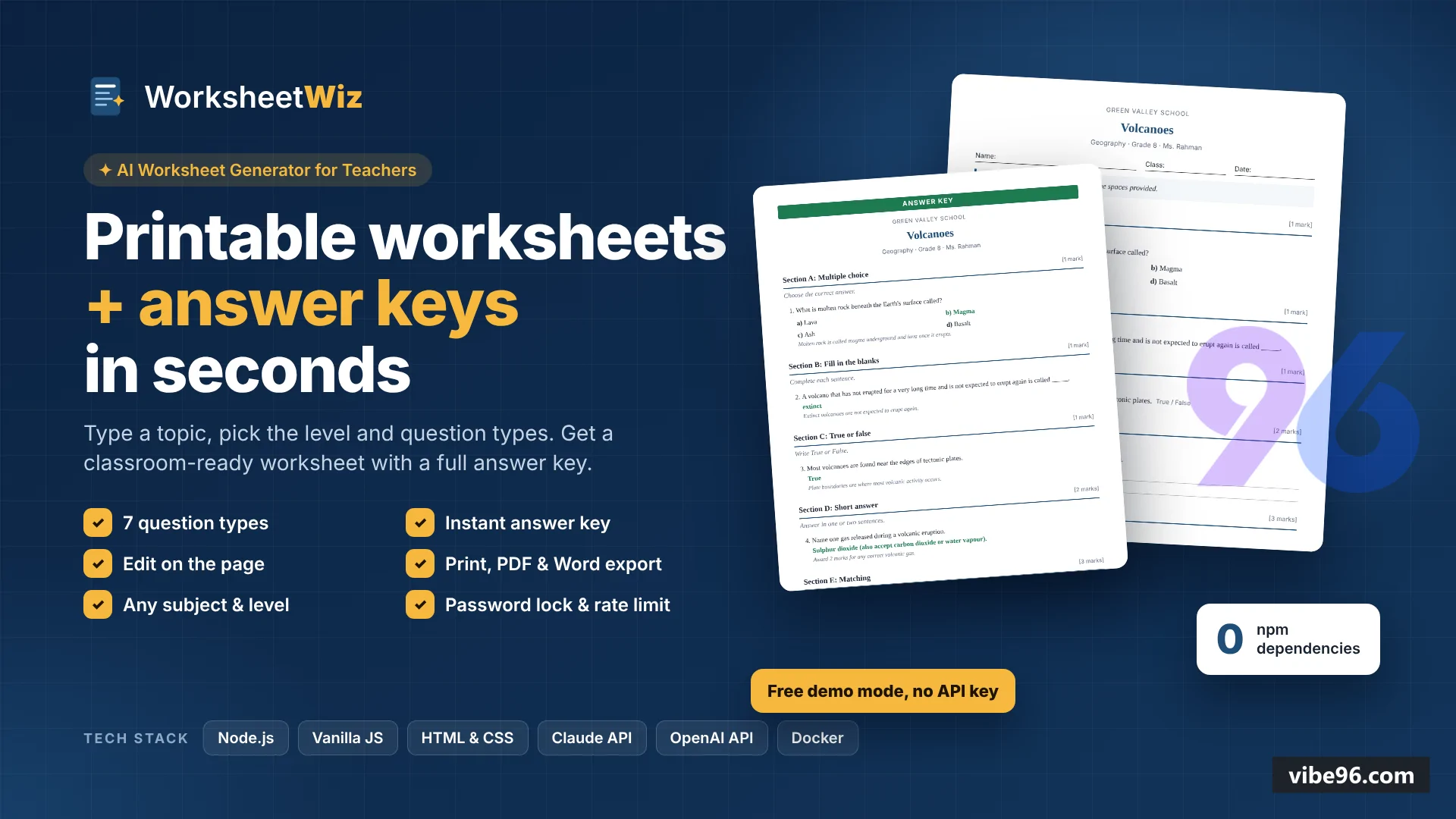
WorksheetWiz turns a topic, grade, difficulty and chosen question types into a printable worksheet with a separate answer key and a teacher's note per answer. It is a zero-dependency Node.js 18+ server (server.js plus lib/ modules) with a vanilla HTML/CSS/JS front end, no build step and no database. Generation runs through Anthropic Claude, OpenAI or any OpenAI-compatible API chosen in .env, and a demo mode serves sample worksheets from data/samples.json without an API key. Teachers can edit text on the page, print or save as PDF, export to Word (.doc), and keep worksheets in a browser-based library. A password lock and per-IP hourly rate limit protect the API bill. Full source is included with a Dockerfile, docker-compose.yml, API and deployment docs, and three test files run with node --test. AI output can contain mistakes, so the README advises teachers to review each worksheet.
Why WorksheetWiz – AI Worksheet Generator for Teachers
What makes it better
than the alternatives
- 01
Seven question types
Multiple choice, fill in the blanks, true/false, short and long answer, matching, and reading comprehension with an original passage.
- 02
Instant answer key
Every worksheet comes with a separate answer key and a short teacher's note explaining each answer.
- 03
Edit, print and export
Change any text directly on the page, then print, save as an A4 PDF or download a Word file.
- 04
Zero dependencies, any AI
No npm install, build step or database; works with Claude, OpenAI or any OpenAI-compatible API.
- 05
Safe to run publicly
Free demo mode with no API key, plus a password lock and hourly rate limit to control AI costs.
Worksheet Generation
- Form with topic
- subject
- level
- difficulty and question-type checkboxes
- Optional curriculum and language settings per README
- Prompt building
- JSON extraction and validation in
lib/prompt.js - Example topic buttons that fill the form and submit
Question Types and Rendering
- Seven question types: mcq
- fill_blank
- true_false
- short_answer
- long_answer
- matching
- reading
- Marks per section and total
Name/class/dateheader- instructions and answer lines
- Separate answer key view with explanation for each question
On-Page Editing
- Edit mode makes worksheet text editable in place
- data-path attributes map edits back to the worksheet object
- Edit mode is switched off automatically before printing
Export and Print
- Print or save as PDF with A4 print styles in styles.css
- Word (.doc) export via
public/js/export.js - School and teacher name shown on the worksheet header
- with a marks toggle
My Worksheets Library
- Save worksheets to the browser's localStorage
- Library drawer to reopen saved worksheets
- Header preferences remembered between visits
AI Providers and Demo Mode
- Anthropic and OpenAI-compatible adapters
- Provider auto-selected from whichever key is set
- or demo mode when none
- Sample worksheets in demo mode with a visible Demo banner and badge
- Mode badge shows the active model
Security and Limits
- Password lock on /api/generate returning 401 when wrong
- In-memory per-IP hourly rate limiter returning 429
- 100 KB request body limit and static-file path traversal guard
- API keys kept server-side; HTML escaping via WW.esc
Deployment and Docs
- Dockerfile on node:20-alpine and docker-compose.yml using .env
- Endpoints: GET /api/config and POST /api/generate
- README
- HowToSetup
- API.md
- DEPLOYMENT.md
- CHANGELOG and licence note
- Tests for prompt parsing
- security and server endpoints
| Language | Version | Framework | Used for | Share of code |
|---|---|---|---|---|
| JavaScript | — | — | Front-end | 73% |
| CSS | — | — | Styling | 13.5% |
| HTML | — | — | Front-end | 13.5% |
- Primary language
- JavaScript (Node.js 18+ server, vanilla browser JS)
- Framework
- None: zero-dependency Node.js http module, vanilla HTML/CSS/JS front end
- Database
- None: no database; saved worksheets live in each user's browser localStorage
- Authentication
- Shared access password (APP_PASSWORD, sent in x-app-password header), optional
- Licence
- Single-site
- Screens
- 1
- Supported languages
- English UI; worksheet content can be requested in any language via the prompt; no RTL support evidenced
- Browser support
- Modern evergreen browsers; responsive layout for desktop, tablet and mobile; no specific versions tested in the digest
| Minimum | Recommended | |
|---|---|---|
| CPU | 1 vCPU | 2 vCPU |
| RAM | 1 GB RAM | 2 GB RAM |
| OS | Node.js 18+ (Dockerfile uses node:20-alpine); runs on any OS with Node.js | Node.js 18+ (Dockerfile uses node:20-alpine); runs on any OS with Node.js |
| Est. monthly hosting | $5 | $5 |
Run from the project root, after creating the settings file:

```bash
cd worksheet-generator
cp "Worksheet App/.env.example" "Worksheet App/.env"
# edit Worksheet App/.env: set ANTHROPIC_API_KEY or OPENAI_API_KEY, or DEMO_MODE=true
docker compose up -d --build
```

Open http://localhost:3000 (or the PORT you set).
On a Linux server with Node.js 18+ installed:

```bash
cd "worksheet-generator/Worksheet App"
cp .env.example .env
# edit .env with your API key and a strong APP_PASSWORD
node server.js
```

For a long-running service, put it behind a reverse proxy with HTTPS and run it under systemd or pm2. Run the tests with `npm test`.
```bash
cd "worksheet-generator/Worksheet App"
DEMO_MODE=true node server.js
```

Read CLAUDE.md first; it lists where each module lives.
Quality report
Manually reviewedHow to read the quality report
What this is. Every project on Vibe96 goes through an automated audit of its source code before a reviewer in Dubai checks it by hand. The score is out of 100; 75 is the minimum to be listed, and any single failing check blocks a listing regardless of the score.
- Security
- No real credentials in the code, every data-changing route protected, admin areas role-gated, no SQL built from user input.
- Code structure
- A developer can navigate and extend it: clear module boundaries, no giant files, little copy-paste.
- Docs & completeness
- The setup guide, example config, schema and required files the builder committed to are actually in the archive.
- Dependency health
- Packages pinned, no known critical vulnerabilities, no abandoned libraries in production paths.
- Build & deploy
- A clean machine can restore, build and start it by following the shipped instructions.
Warnings are problems that didn't block the listing; they stay visible here until a later version clears them. The audit reads the code — it does not run it — so always try the live demo before you buy. Lines of code are counted from the same audited archive.
Reviewer notes (2 minor)
Zero-dependency node app is reproducible; minor docker and setup-doc gaps remain; only 3 routes; password lock is optional and weak, but no per-user data or admin routes exist. None of these stop the software from working; the developer has been told and improvements come in a future update.
Versions & updates
No updates yet. New versions appear here with a changelog.
Buyers receive updates free for 1 year.
What you get
- </>Full source codeThe complete audited source, delivered as a download from your account. No obfuscation.
- ▤DocumentationSetup guide, architecture notes, CLAUDE.md and AGENTS.md.
- ↻One year of updatesEvery new version the builder publishes, free for 12 months.
- ♧30 days of supportInstallation and defect support through Vibe96 tickets.