 Built by
About this software
About Review Room — Visual Feedback & Client Approval Platform
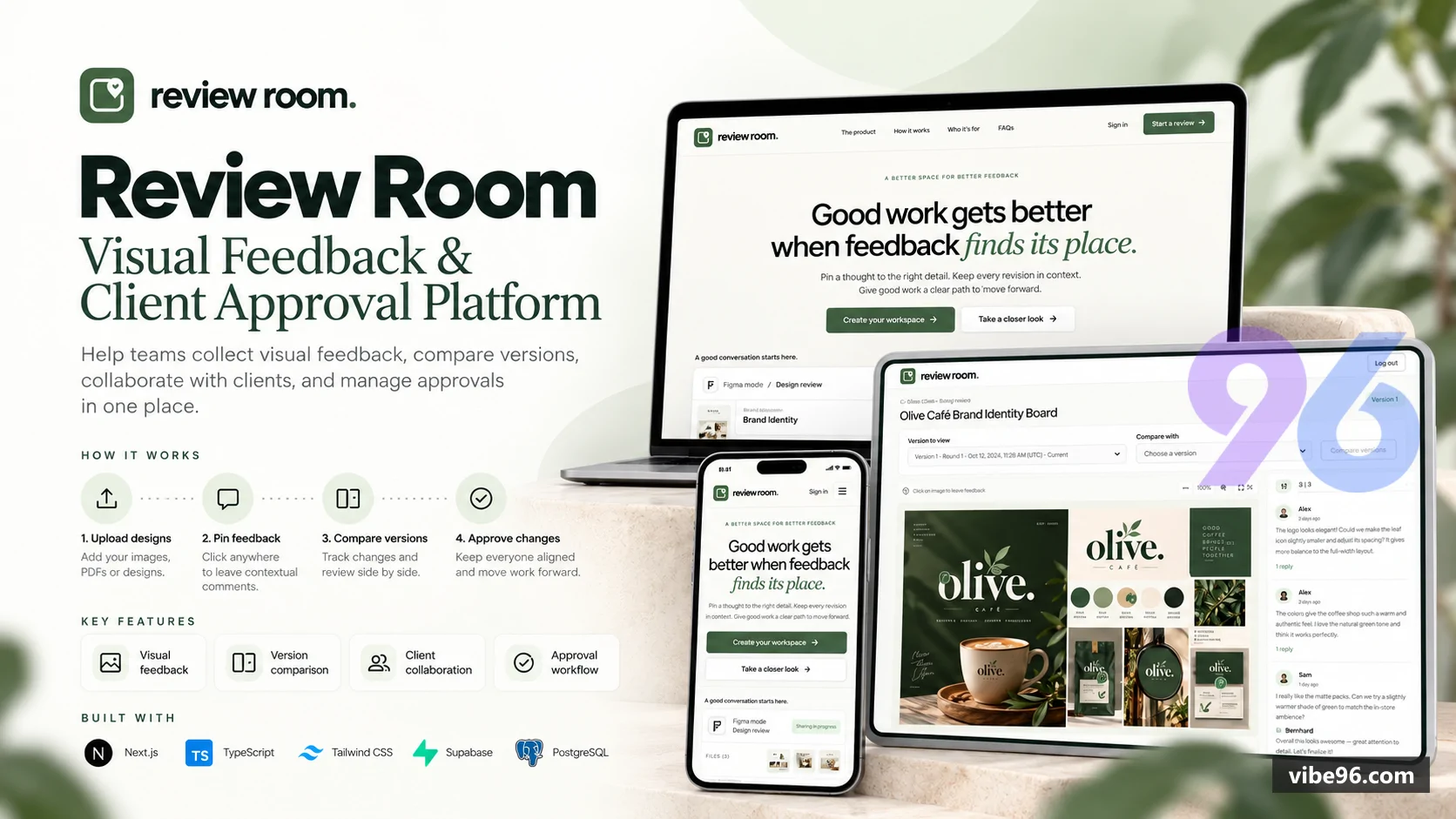
Review Room — Visual Feedback & Client Approval Platform
Make design reviews easier, client feedback clearer, and project approvals more organized.
Review Room is a modern visual feedback and client approval platform designed for creative agencies, graphic designers, freelancers, marketing teams, and businesses that manage visual projects.
Instead of dealing with scattered emails, screenshots, and lengthy message threads, Review Room brings design uploads, image annotations, revision tracking, client approvals, and final file delivery into one organized workspace.
From the first design submission to final client approval, every step stays connected.
WHY CHOOSE REVIEW ROOM?
Collect feedback where it matters. Keep design revisions organized. Give clients a clear way to approve work or request changes.
Review Room helps teams manage the complete visual review workflow without switching between multiple tools.
KEY FEATURES
01. VISUAL FEEDBACK & IMAGE ANNOTATION
• Pin comments directly on specific areas of design images.
• Reply to feedback and manage comment discussions.
• Edit, delete, and resolve feedback as work progresses.
• Keep comments connected to the relevant design.
02. DESIGN UPLOADS & VERSION CONTROL
• Upload JPG, PNG, and WebP design files.
• Manage multiple design revisions.
• Access version history.
• Compare two design versions side by side.
03. CLIENT APPROVAL WORKFLOW
• Let assigned clients approve designs or request changes.
• Track approval decisions and outstanding revisions.
• Support multiple client approvals.
• Complete projects after the required approvals.
04. PROJECT & TEAM MANAGEMENT
• Create and organize design projects.
• Assign project members and manage access.
• Collaborate through Owner, Designer, and Client roles.
• Track activities, notifications, and unread updates.
05. SECURE SHARING & FINAL DELIVERY
• Generate expiring and revocable read-only share links.
• Download approved original design files.
• Generate delivery summaries.
• Export project delivery manifests.
06. SECURITY & DATA RECOVERY
• PostgreSQL Row Level Security (RLS).
• Private Supabase Storage for uploaded assets.
• Role-based workspace permissions.
• Cross-workspace data isolation.
• Soft deletion with a 30-day restore window.
WHO IS REVIEW ROOM FOR?
Creative Agencies — Manage feedback, revisions, and approvals across client projects.
Freelance Designers — Collect precise client feedback and deliver approved designs professionally.
Graphic Design Studios — Organize visual assets, revisions, and approval decisions.
Marketing Teams — Review campaign graphics, promotional creatives, and other visual materials.
Businesses — Keep internal design reviews and approval workflows organized.
Developers — Customize and deploy a visual feedback platform using the included source code.
TECHNOLOGY STACK
Frontend: Next.js, React, TypeScript
Database: PostgreSQL, Prisma ORM
Authentication: Supabase Auth, Email/Password, Google OAuth
File Storage: Private Supabase Storage
Security: Role-based access control and PostgreSQL RLS
Deployment: Vercel or compatible Node.js hosting
WHAT'S INCLUDED?
• Complete application source code
• Owner, Designer, and Client workspace functionality
• Visual feedback and approval workflows
• Prisma database schema and migrations
• Database setup SQL and fictional seed data
• Environment configuration template
• Installation and deployment documentation
• Interactive demo with sample projects
PRODUCT INFORMATION
Version: 1.1.2
Product Type: Self-hostable web application
License: Vibe96 Standard License (Single-site)
Category: Productivity & Collaboration
Note: Subscription billing and automated SaaS plan management are not included in this release.
A simpler way to review designs, manage revisions, and deliver approved work.
Why Review Room — Visual Feedback & Client Approval Platform
What makes it better
than the alternatives
- 01
Pinned Visual Feedback
Collect precise, location-based comments directly on design images, with replies and resolution tracking.
- 02
Structured Client Approvals
Manage approval decisions, revision requests, and project completion across multiple assigned clients.
- 03
Side-by-Side Version Comparison
Track design revisions and visually compare versions to simplify feedback and decision-making.
- 04
Secure Team Workspaces
Collaborate through Owner, Designer, and Client roles with workspace permissions and PostgreSQL RLS protection.
- 05
Complete Design Delivery
Share approved files securely, generate delivery summaries, and export project manifests from one organized workflow.
Authentication & User Roles
- Email/password login
- Google authentication
Owner/Designer/Clientroles- and role-based access control.
Workspace & Project Management
- Multiple workspaces
- project creation
- member assignment
- access management
- and project status tracking.
Design Asset Management
- JPG
- PNG
- and WebP uploads
- design revisions
- file management
- and version history.
Visual Feedback System
- Image-based pinned comments
- threaded replies
- comment editing
- deletion
- and feedback resolution.
Version Comparison
- Side-by-side design comparison and revision review.
Client Approval Management
- Approval decisions
- change requests
- multiple assigned client approvals
- and project completion workflow.
Secure File Delivery
- Approved original file downloads
- delivery summaries
- and manifest exports.
Share Link Management
- Expiring and revocable read-only design sharing links.
Collaboration & Notifications
- Email invitations
- notification support
- project activity timeline
- and unread tracking.
Security & Data Protection
- Private Supabase Storage
- PostgreSQL RLS
- workspace isolation
- and role-based permissions.
Data Recovery
- Soft deletion and 30-day restore functionality.
Demo & Marketing
- Interactive public demo
- sample projects
- role-based demo accounts
- responsive website
- SEO
- and Vercel Analytics.
Installation & Customization
- Full Next.js source code
- Prisma migrations
- database SQL and seed
- environment template
- and deployment documentation.
| Language | Version | Framework | Used for | Share of code |
|---|---|---|---|---|
| TypeScript | — | — | Front-end | 45% |
| CSS | — | — | Styling | 24% |
| TypeScript (React) | — | — | Front-end | 22.6% |
| SQL | — | — | Database | 7.8% |
| Python | — | — | Web, API | 0.6% |
- Primary language
- TypeScript 6.0.3
- Framework
- Next.js 16.4.2 (App Router), React 19.3.1
- Database
- PostgreSQL 14+
- Authentication
- Supabase Auth (email/password + Google OAuth)
- Licence
- Single-site
- Screens
- 18
- Database tables
- 16
- Supported languages
- English only
- Browser support
- Modern browsers (Chrome, Firefox, Safari, Edge); responsive 320px+
| Minimum | Recommended | |
|---|---|---|
| CPU | 2 vCPU | 2 vCPU |
| RAM | 2 GB | 4 GB |
| OS | Node.js 22.18.0+, Linux/macOS | Node.js 22.18.0+, Linux/macOS |
| Est. monthly hosting | $25 | $25 |
```bash
# Install Vercel CLI
npm i -g vercel

# Set environment variables in Vercel dashboard:
# NEXT_PUBLIC_APP_URL, NEXT_PUBLIC_SUPABASE_URL, NEXT_PUBLIC_SUPABASE_PUBLISHABLE_KEY,
# SUPABASE_SECRET_KEY, DATABASE_URL, DIRECT_URL, SUPABASE_DB_CA_CERT,
# SUPABASE_STORAGE_BUCKET, SIGNUP_RATE_LIMIT_SECRET, CRON_SECRET

# Deploy
vercel --prod

# Run migrations
pnpm db:deploy
```
```bash
# Copy environment template
cp .env.example .env
# Edit .env with your Supabase credentials

# Install dependencies
pnpm install

# Generate Prisma client
pnpm db:generate

# Run migrations
pnpm db:deploy

# Build and start
pnpm build
pnpm start
```
```bash
# Install pnpm 11.21.0
npm install -g [email protected]

# Install dependencies
pnpm install

# Copy .env.example to .env and configure Supabase credentials
cp .env.example .env

# Generate Prisma client
pnpm db:generate

# Run migrations
pnpm db:deploy

# Start development server
pnpm dev
# Visit http://localhost:3000
```
Quality report
Manually reviewedHow to read the quality report
What this is. Every project on Vibe96 goes through an automated audit of its source code before a reviewer in Dubai checks it by hand. The score is out of 100; 75 is the minimum to be listed, and any single failing check blocks a listing regardless of the score.
- Security
- No real credentials in the code, every data-changing route protected, admin areas role-gated, no SQL built from user input.
- Code structure
- A developer can navigate and extend it: clear module boundaries, no giant files, little copy-paste.
- Docs & completeness
- The setup guide, example config, schema and required files the builder committed to are actually in the archive.
- Dependency health
- Packages pinned, no known critical vulnerabilities, no abandoned libraries in production paths.
- Build & deploy
- A clean machine can restore, build and start it by following the shipped instructions.
Warnings are problems that didn't block the listing; they stay visible here until a later version clears them. The audit reads the code — it does not run it — so always try the live demo before you buy. Lines of code are counted from the same audited archive.
Reviewer notes (1 minor)
Small improvements the developer has been told about. None of them stop the software from working.
Versions & updates
No updates yet. New versions appear here with a changelog.
Buyers receive updates free for 1 year.
What you get
- </>Full source codeThe complete audited source, delivered as a download from your account. No obfuscation.
- ▤DocumentationSetup guide, architecture notes, CLAUDE.md and AGENTS.md.
- ↻One year of updatesEvery new version the builder publishes, free for 12 months.
- ♧30 days of supportInstallation and defect support through Vibe96 tickets.